v3.7 之後顯著的渲染與版面配置變更
Flutter v3.7 之後非 API 相關的重大變更。
變更內容
#本節列出顯著的非 API 破壞性變更。
(僅影響測試)FlutterTest 現為預設測試字型
#
FlutterTest 字型已取代 Ahem,成為測試中的預設字型:當未指定 fontFamily,或指定的字型家族未註冊時,測試將使用
FlutterTest 字型來渲染文字。如果在測試中明確指定為 fontFamily,Ahem 字型仍然可用。
FlutterTest 字型比 Ahem 提供更精確的字型與字形度量,且這些度量通常與字型引擎無關。
更多關於測試字型的細節,請參閱 Flutter Test Fonts
Wiki 頁面。
差異說明
FlutterTest 字型在外觀上幾乎與舊的預設字型 Ahem 相同:大多數字元的字形都是填滿 em 方格的方塊。FlutterTest
字型與 Ahem 字型之間的主要差異如下:
1. 不同的基線位置
FlutterTest 字型的上升線(ascent)與下降線(descent)分別為 0.75 em 與 0.25 em,而 Ahem 則分別為 0.8 em 與 0.2 em。
在下方的 golden image 範例變更中,白色區塊為使用 Ahem 與 FlutterTest 渲染的文字。由於新字型的下降線較大,第二個字元在新字型中看起來較高。
變更前(Ahem) |
變更後 | 動畫差異 |
|---|---|---|

|

|
 |
2. 不同的裝飾線位置
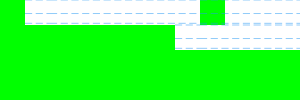
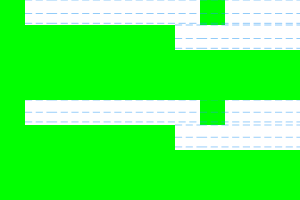
FlutterTest 的底線(underline)位置比 Ahem 略高。
在下方的 golden image 範例變更中,三行白色區塊為使用 Ahem 與 FlutterTest 渲染的文字。藍色虛線分別標示每一行的 TextDecoration.overline/TextDecoration.lineThrough/TextDecoration.underline
位置。
變更前(Ahem) |
變更後 | 動畫差異 |
|---|---|---|
|

|
 |
3. 未映射字元的字形略有不同
在兩種字型中,未映射的字元都會以中空方框顯示,但細節略有差異:
變更前(Ahem) | 變更後 | 差異 |
|---|---|---|

|

|
 |
參考資料
#相關 PR:
-
FlutterTest字型新增於:Add new test font -
FlutterTest字型成為預設於:Make FlutterTest the default test font
Wiki 頁面:
Unless stated otherwise, the documentation on this site reflects Flutter 3.44.0. Page last updated on 2026-06-14. View source or report an issue.