提示詞
學習如何在 Flutter 中使用系統指令、動態參數與版本控管技術來建置並最佳化生成式 AI 提示詞。
假設你已為 Flutter 應用程式完成 Firebase 專案設定,並具備使用 Firebase AI Logic SDK 所需的設定(可在 README 中了解詳情),那麼你已經準備好開始使用生成式 AI (Generative AI) 了。生成式 AI 是機器學習 (Machine Learning, ML) 的一個分支,它使用在大量人類語言資料上訓練的神經網路來生成大型語言模型 (Large Language Model, LLM)。目前最好的模型(例如 Google Gemini)基本上是以整個網際網路的資料訓練而成的。
在這樣的規模下,以如此大量資料訓練的模型已具備解讀人類語言並生成實用語言輸出的能力。相信你一定用過 Gemini 聊天應用程式(或 ChatGPT、Claude 或其他聊天應用程式),因此你知道,如果使用模糊的語言與 LLM 互動,很可能得到模糊且往往不正確的結果。若想獲得良好的結果,就必須使用良好的提示詞 (prompt)。
提示詞的建構
#提示詞是你提供給 LLM 以取得期望輸出結果的輸入內容,可包含文字以及零個或多個檔案(例如圖片或 PDF 檔案)。如果你要在應用程式中加入聊天功能,那麼提示詞將由使用者輸入(Flutter AI Toolkit 可協助建置聊天 UI)。若你是使用 LLM 來實作應用程式的功能,例如解析圖片以取得填字遊戲資料,則需要自行建構提示詞。建構的方式相當重要。
舉例而言,在建置 Crossword Companion 的過程中,最初的線索解題提示詞如下所示:
You are a crossword puzzle solver. Your goal is to solve the puzzle by filling in the grid with the correct answers. Given the current state of the crossword grid and a single clue, provide the answer for that clue. The answer should be a single word, returned in a JSON object that matches the following schema: '{"type": "object", "properties": {"answer": {"type": "string"}}}'.
# Puzzle Information
## Grid Layout
The grid is (${grid.width}x${grid.height}):
${_getGridStateAsString(grid)}
## Clue
${clue.number} ${clue.direction == ClueDirection.across ? 'Across' : 'Down'}: ${clue.text}
這個提示詞並非一無是處,它有一些有用的部分:
- 人設 (Persona): 「You are a crossword puzzle solver」這段話縮小了模型的關注範圍
- 脈絡 (Context): 提供了謎題的目前狀態
- 查詢 (Query): 請模型解答一個線索
- 格式 (Format): 要求以 JSON 格式輸出,以便以程式化方式解析結果
然而,由於資料具有二維的特性,這對某些模型來說是個難以解答的提示詞。Gemini 2.5 Flash(當時可用的模型中效率較高的一款)的結果不一致。Gemini 2.5 Pro 的結果品質極佳,但速度較慢且成本較高。除錯後發現,Pro 基本上每次呼叫時都在解整道謎題,但只回傳單一線索的答案。
所需的是具備 Flash 的效率,同時擁有 Pro 的品質。為此,需要對提示詞進行一些調整:
Your task is to solve the following crossword clue.
**Clue:** "${clue.text}"
**Constraints:**
- The answer is a **$length-letter** word.
- The current letter pattern is `$pattern`, where `_` represents an unknown letter.
Return your answer and confidence score in the required JSON format.
這個提示詞要求解答線索、提供重要的脈絡資訊,並指定輸出格式。它不再傳入整個二維格線的狀態,而是將輸入縮減為長度限制與一個模式,例如「_ R _ Y」。這些簡化使 Flash 能產生高品質的結果,而且速度夠快,讓整個過程充滿趣味。
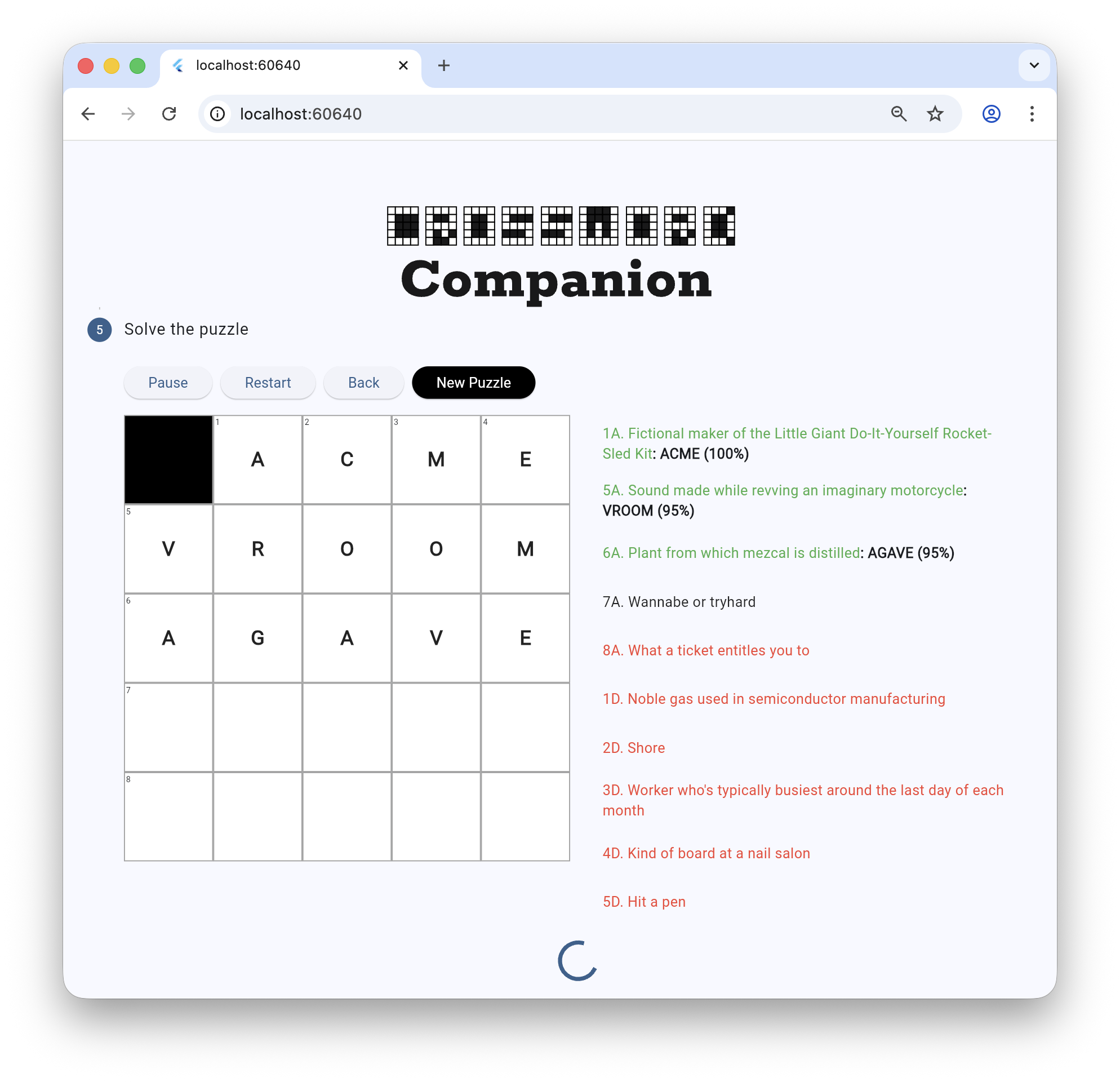
分層設計提示詞
#用於解答線索的提示詞並非模型看到的唯一提示詞。模型還會接收系統指令 (system instruction)(也稱為系統訊息或系統提示詞),它是在建立模型實例時設定的。可以把系統指令想成「這是你的工作內容」,而個別提示詞則是「現在執行這件事」。
以下是線索解題模型的部分系統指令(其餘部分稍後說明):
final clueSolverSystemInstruction =
'''
You are an expert crossword puzzle solver.
**Follow these rules at all times:**
1. **Prefer Common Words:** Prioritize common English words and proper nouns. Avoid obscure, archaic, or highly technical terms unless the clue strongly implies them.
2. **Match the Clue:** Ensure your answer strictly matches the clue's tense, plurality (singular vs. plural), and part of speech.
3. **Verify Grammatically:** If a clue implies a specific part of speech (e.g., it's a verb, adverb, or plural), it's a good idea to use the `getWordMetadata` tool to verify your candidate answer matches. However, avoid using it for every clue.
4. **Be Confident:** Provide a confidence score from 0.0 to 1.0 indicating your certainty.
5. **Trust the Clue Over the Pattern:** The provided letter pattern is only a suggestion based on other potentially incorrect answers. Your primary goal is to find the best word that fits the **clue text**. If you are confident in an answer that contradicts the provided pattern, you should use that answer.
6. **Format Correctly:** You must return your answer in the specified JSON format.
...
''';
確定好要使用的模型與系統指令後,我們就具備了建立實例所需的一切:
// The model for solving clues.
_clueSolverModel = FirebaseAI.googleAI().generativeModel(
  model: 'gemini-2.5-flash',
  systemInstruction: Content.text(clueSolverSystemInstruction),
  ...
);
系統指令通常是靜態的,而個別提示詞則通常是根據資料動態建立的。
參數化你的提示詞
#每個線索解題提示詞都使用線索文字、答案的目標長度,以及根據先前已解答的線索所形成的目前模式(例如「_R_Y」)來動態建立:
String getSolverPrompt(Clue clue, int length, String pattern) =>
'''
Your task is to solve the following crossword clue.
**Clue:** "${clue.text}"
**Constraints:**
- The answer is a **$length-letter** word.
- The current letter pattern is `$pattern`, where `_` represents an unknown letter.
Return your answer and confidence score in the required JSON format.
''';
有了提示詞後,我們就可以將其傳遞給模型以取得線索答案:
final result = await _clueSolverModel.generateContent(
  prompt: getSolverPrompt(clue, length, pattern),
);
提示詞的版本控管
#
這個基本應用程式將提示詞字串保存在程式碼中,這使得追蹤與更新變得困難。對於正式版應用程式,最好將提示詞與程式碼分離,例如以 Flutter 資源 (assets) 的方式打包。整理提示詞檔案的一種方式是使用
Google dotprompt 格式,它允許你撰寫如下所示的 .prompt
檔案:
---
model: googleai/gemini-2.5-flash
input:
schema:
text: string
output:
format: json
schema:
title?: string, the title of the article if it has one
summary: string, a 3-sentence summary of the text
tags?(array, a list of string tag category for the text): string
---
Extract the requested information from the given text. If a piece of information is not present, omit that field from the output.
Text:
若要展開 .prompt 檔案以在你的 Dart 和 Flutter 專案中使用,可以使用 dotprompt_dart 套件。
Unless stated otherwise, the documentation on this site reflects Flutter 3.44.0. Page last updated on 2026-06-14. View source or report an issue.