工具呼叫(又稱函式呼叫)
了解如何使用 Firebase AI Logic SDK 實作工具呼叫、管理代理迴圈,以及整合人工介入互動。
雖然 LLM 基本上是以整個網際網路的內容訓練而成,但它們並非無所不知。它們只知道訓練當天公開網路上的資訊,對於更晚近的內容一無所知。對於你或你的組織的私有資訊,它們也無從得知。甚至連它們確實知道的事情,也很容易與其他知識混淆。
在這些情境以及許多其他情境下,我們通常會為 LLM 提供一個或多個工具 (tool)。
工具的定義
#
工具 (tool) 是一個名稱、一段描述,以及一份 JSON 綱要 (JSON schema),用來定義 LLM「呼叫」該工具時輸入資料的格式。例如,如果我們提示 LLM「減少奶奶的全美式早餐食譜中的碳水化合物」,除非我們提供一個可接受查詢字串的
lookupRecipe 工具來查詢食譜,否則它不會知道奶奶的食譜是什麼。
從概念上來說,工具是我們交給 LLM 的東西,當它需要某些資料或服務時便可呼叫。LLM 呼叫工具的方式,是以一種特殊格式的訊息來回應應用程式的請求,這種格式代表「工具呼叫」。工具呼叫訊息包含工具的名稱及 JSON 引數。應用程式處理工具呼叫後,會將結果包含在另一個 LLM 請求中,LLM 再對此請求做出回應。
這個過程可能會持續一段時間。應用程式可以為模型實例設定任意數量的工具(不過,使用一組功能不重疊的精準工具,LLM 的表現通常較佳)。LLM 可以在回應中一次打包多個工具呼叫,也可以在一次請求中接收多個工具結果。LLM 透過由請求/回應配對組成的訊息堆疊,整合多輪的提示與工具呼叫結果的往返。
完成工具呼叫後,LLM 會返回最終回應,例如「這是奶奶的全美式早餐食譜的高蛋白低碳水版本……」。
Gemini 函式
#在 Firebase AI Logic SDK 中,工具被稱為「函式 (function)」,但兩者是同一件事。在範例中,填字遊戲線索解題模型設定了一個查詢單字詳細資訊的函式。當 LLM 希望取得某個單字的詳細資訊以協助解題時,呼叫此函式可從 Free Dictionary API 取得資料:
[
  {
    "word": "tool",
    "phonetic": "/tuːl/",
    "phonetics": [
      {
        "text": "/tuːl/",
        "audio": "https://api.dictionaryapi.dev/media/pronunciations/en/tool-uk.mp3",
        "sourceUrl": "https://commons.wikimedia.org/w/index.php?curid=94709459",
        "license": {
          "name": "BY-SA 4.0",
          "url": "https://creativecommons.org/licenses/by-sa/4.0"
        }
      }
    ],
    "meanings": [
      {
        "partOfSpeech": "noun",
        "definitions": [
          {
            "definition": "A mechanical device intended to make a task easier.",
            "synonyms": [],
            "antonyms": [],
            "example": "Hand me that tool, would you?   I don't have the right tools to start fiddling around with the engine."
          },
...
應用程式中有一個 Dart 函式負責執行查詢:
// Look up the metadata for a word in the dictionary API.
Future<Map<String, dynamic>> _getWordMetadataFromApi(String word) async {
final url = Uri.parse(
'https://api.dictionaryapi.dev/api/v2/entries/en/${Uri.encodeComponent(word)}',
);
final response = await http.get(url);
return response.statusCode == 200
? {'result': jsonDecode(response.body)}
: {'error': 'Could not find a definition for "$word".'};
}
模型在初始化時會將查詢函式設定為工具:
// The model for solving clues.
_clueSolverModel = FirebaseAI.googleAI().generativeModel(
  model: 'gemini-2.5-flash',
  systemInstruction: Content.text(clueSolverSystemInstruction),
  tools: [
    Tool.functionDeclarations([
      FunctionDeclaration(
        'getWordMetadata',
        'Gets grammatical metadata for a word, like its part of speech. '
        'Best used to verify a candidate answer against a clue that implies a '
        'grammatical constraint.',
        parameters: {
           'word': Schema(SchemaType.string, description: 'The word to look up.'),
         },
       ),
    ]),
  ],
);
為提高可靠性,建議也在系統指令中列出這些工具:
static String get clueSolverSystemInstruction =>
'''
You are an expert crossword puzzle solver.
...
### Tool: `getWordMetadata`
You have a tool to get grammatical information about a word.
**When to use:**
- This tool is most helpful as a verification step after you have a likely answer.
- Consider using this tool when a clue contains a grammatical hint that could be ambiguous.
- **Good candidates for verification:**
- Clues that seem to be verbs (e.g., "To run," "Waving").
- Clues that are adverbs (e.g., "Happily," "Quickly").
- Clues that specify a plural form.
- **Try to avoid using the tool for:**
- Simple definitions (e.g., "A small dog").
- Fill-in-the-blank clues (e.g., "___ and flow").
- Proper nouns (e.g., "Capital of France").
**Function signature:**
```json
${jsonEncode(_getWordMetadataFunction.toJson())}
```
''';
當應用程式發出請求時,模型現在擁有一個工具,可在判斷有所幫助時使用。要支援工具呼叫,我們需要實作代理迴圈 (agentic loop)。
代理迴圈
#
LLM 在功能上是無狀態 (stateless) 的,這意味著每次請求都必須提供它所需的所有資料。對於僅包含提示與附加檔案的請求,Firebase AI Logic SDK 會在模型實例上公開 generateContent
方法。
然而,工具呼叫需要一組訊息歷史紀錄,包含初始提示,以及構成工具呼叫與工具結果的回應/請求配對。為支援這一點,Firebase AI Logic 提供了「聊天 (chat)」物件來收集歷史紀錄。我們用它來建置代理迴圈:
- 啟動聊天以在多組請求/回應配對中保存訊息歷史
- 收集其提供的所有工具呼叫的工具結果
- 將工具結果包含在新請求中
- 持續迴圈,直到模型提供不含工具呼叫的回應
- 返回跨所有回應累積的文字
以下是以 GenerativeModel 類別上的擴充方法 (extension method) 表達的演算法,讓我們可以像呼叫 generateContent
一樣呼叫它:
extension on GenerativeModel {
Future<String> generateContentWithFunctions({
required String prompt,
required Future<Map<String, dynamic>> Function(FunctionCall) onFunctionCall,
}) async {
// Use a chat session to support multiple request/response pairs, which is
// needed to support function calls.
final chat = startChat();
final buffer = StringBuffer();
var response = await chat.sendMessage(Content.text(prompt));
while (true) {
// Append the response text to the buffer.
buffer.write(response.text ?? '');
// If no function calls were collected, we're done
if (response.functionCalls.isEmpty) break;
// Append a newline to separate responses.
buffer.write('\n');
// Execute all function calls
final functionResponses = <FunctionResponse>[];
for (final functionCall in response.functionCalls) {
try {
functionResponses.add(
FunctionResponse(
functionCall.name,
await onFunctionCall(functionCall),
),
);
} catch (ex) {
functionResponses.add(
FunctionResponse(functionCall.name, {'error': ex.toString()}),
);
}
}
// Get the next response stream with function results
response = await chat.sendMessage(
Content.functionResponses(functionResponses),
);
}
return buffer.toString();
}
}
此方法接受一個提示,以及一個用於處理特定工具呼叫的回呼(callback),範例中以此回呼來處理單字查詢函式:
await _clueSolverModel.generateContentWithFunctions(
  prompt: getSolverPrompt(clue, length, pattern),
  onFunctionCall: (functionCall) async => switch (functionCall.name) {
    'getWordMetadata' => await _getWordMetadataFromApi(
      functionCall.args['word'] as String,
    ),
    _ => throw Exception('Unknown function call: ${functionCall.name}'),
  },
);
結構化輸出讓 LLM 在程式設計上更易於使用,而工具則將 LLM 轉變為「代理 (agent)」(更多內容請見互動模式一節)。
結構化輸出與工具呼叫
#結合結構化輸出與工具呼叫能產生強大的組合。在範例中,線索解題器有一個查詢單字詳細資訊的工具,同時也被要求返回 JSON,其中包含解答與信心分數,兩者都會顯示在應用程式的任務清單中:
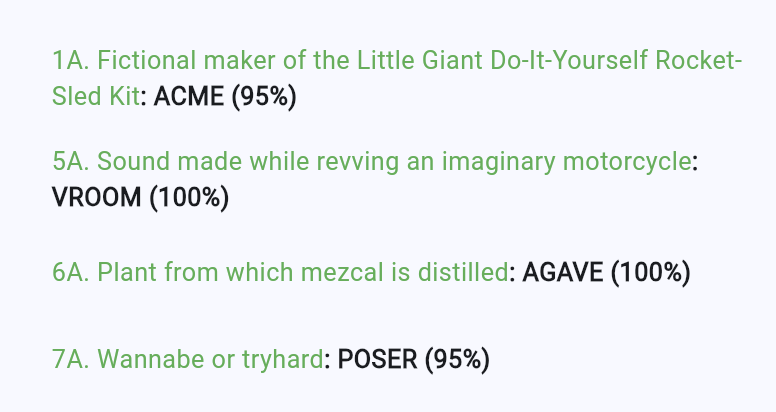
不幸的是,在撰寫本文時,使用 Firebase AI Logic SDK 同時組合結構化輸出與函式,會產生例外:
Function calling with a response mime type: 'application/json' is unsupported
作為此問題的(希望是暫時的)解決方案,範例移除了結構化輸出設定,改以名為 returnResult 的工具來模擬結構化輸出:
 // The model for solving clues.
_clueSolverModel = FirebaseAI.googleAI().generativeModel(
  model: 'gemini-2.5-flash',
  systemInstruction: Content.text(clueSolverSystemInstruction),
  tools: [
    Tool.functionDeclarations([
      ...,
      FunctionDeclaration(
        'returnResult',
        'Returns the final result of the clue solving process.',
        parameters: {
        'answer': Schema(
          SchemaType.string,
          description: 'The answer to the clue.',
        ),
        'confidence': Schema(
          SchemaType.number,
          description: 'The confidence score in the answer from 0.0 to 1.0.',
          ),
        },
      ),
    ]),
  ],
);
returnResult 方法也在系統指令中被提及:
static String get clueSolverSystemInstruction =>
'''
You are an expert crossword puzzle solver.
...
### Tool: `returnResult`
You have a tool to return the final result of the clue solving process.
**When to use:**
- Use this tool when you have a final answer and confidence score to return. You
must use this tool exactly once, and only once, to return the final result.
**Function signature:**
```json
${jsonEncode(_returnResultFunction.toJson())}
```
''';
當模型呼叫 returnResult 時,範例會快取結果,solveClue 在呼叫 generateContentWithFunctions
後會查詢此結果:
// Buffer for the result of the clue solving process.
final _returnResult = <String, dynamic>{};
// Cache the return result of the clue solving process via a function call.
// This is how we get JSON responses from the model with functions, since the
// model cannot return JSON directly when tools are used.
Map<String, dynamic> _cacheReturnResult(Map<String, dynamic> returnResult) {
assert(_returnResult.isEmpty);
_returnResult.addAll(returnResult);
return {'status': 'success'};
}
Future<ClueAnswer?> solveClue(Clue clue, int length, String pattern) async {
// Clear the return result cache; this is where the result will be stored.
_returnResult.clear();
// Generate JSON response with functions and schema.
await _clueSolverModel.generateContentWithFunctions(
prompt: getSolverPrompt(clue, length, pattern),
onFunctionCall: (functionCall) async => switch (functionCall.name) {
'getWordMetadata' => ...,
'returnResult' => _cacheReturnResult(functionCall.args),
_ => throw Exception('Unknown function call: ${functionCall.name}'),
},
);
// Use the structured output that the LLM has called function with
assert(_returnResult.isNotEmpty);
return ClueAnswer(
answer: _returnResult['answer'] as String,
confidence: (_returnResult['confidence'] as num).toDouble(),
);
}
在 Firebase AI Logic 中組合結構化輸出與工具呼叫需要多費一些工夫,但結果是值得的!
人工介入
#到目前為止,我們看到工具被用於收集資料與格式化輸出。我們也可以用它們來讓人類參與其中。
舉例來說,範例有時會傳入一個解答應符合的字母模式,例如「_R_Y」,而模型可能想建議一個不符合此模式的答案,例如「RENT」。這類衝突正是請求使用者協助的好時機: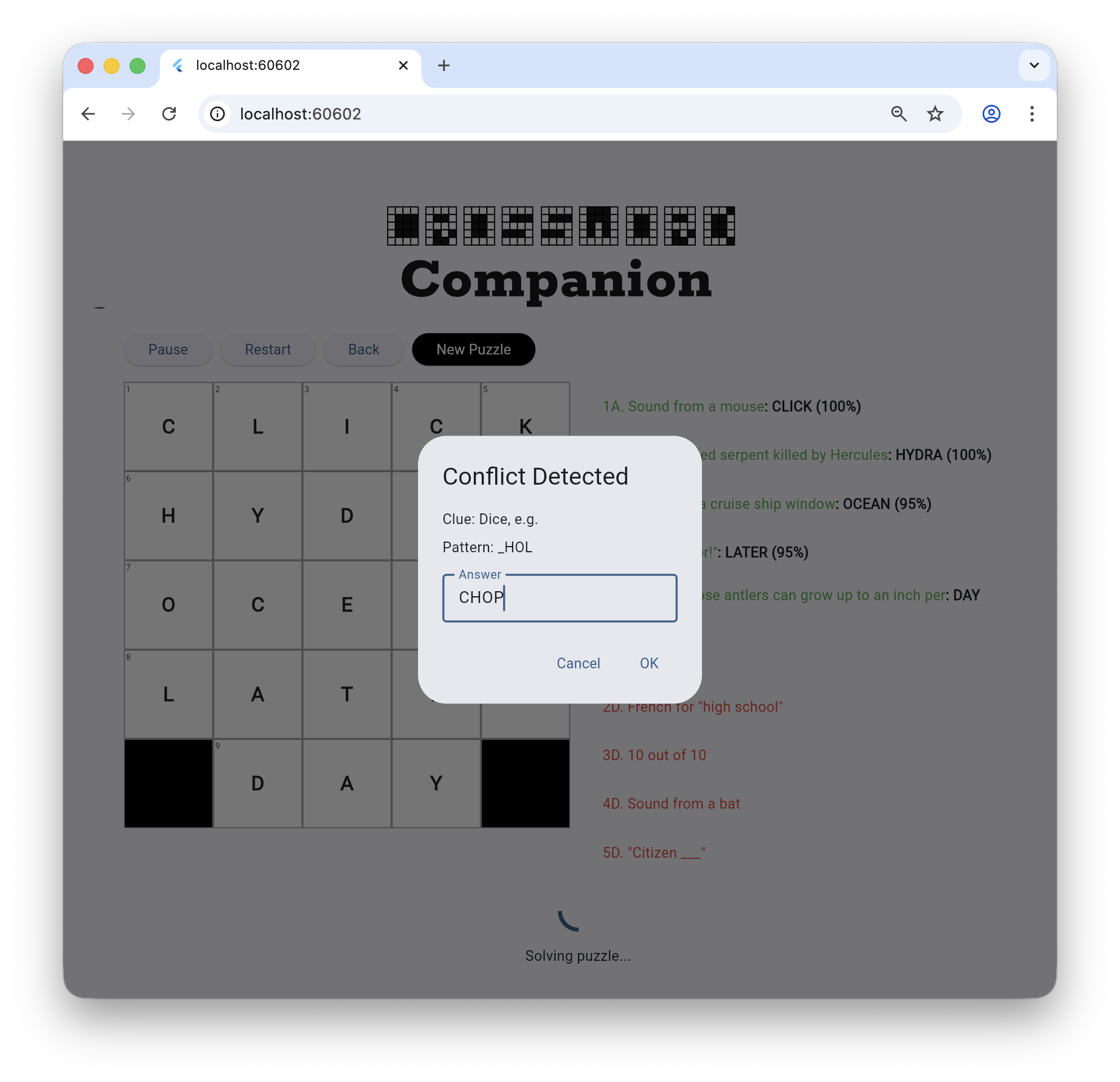
這被稱為「人工介入 (human in the loop)」,是人類與 LLM 協作的另一種方式。Flutter 與 Firebase AI Logic SDK 讓這一切易於實作。首先,範例定義一個函式並設定模型:
// The new function to let the LLM resolve solution conflicts
static final _resolveConflictFunction = FunctionDeclaration(
'resolveConflict',
'Asks the user to resolve a conflict between the letter pattern and the '
'proposed answer. Use this BEFORE calling returnResult if the answer you '
'want to propose does not match the letter pattern.',
parameters: {
'proposedAnswer': Schema(
SchemaType.string,
description: 'The answer the LLM wants to suggest.',
),
'pattern': Schema(
SchemaType.string,
description: 'The current letter pattern from the grid.',
),
'clue': Schema(SchemaType.string, description: 'The clue text.'),
},
);
// Pass the new tool to the model for solving clues.
final _clueSolverModel = FirebaseAI.googleAI().generativeModel(
model: 'gemini-2.5-flash',
systemInstruction: Content.text(clueSolverSystemInstruction),
tools: [
Tool.functionDeclarations([
...
_resolveConflictFunction,
]),
],
);
// Let the LLM know that it has a new tool.
static String get clueSolverSystemInstruction =>
'''
You are an expert crossword puzzle solver.
...
### Tool: `resolveConflict`
You have a tool to ask the user to resolve a conflict.
**When to use:**
- Use this tool **BEFORE** `returnResult` if your proposed answer conflicts with the provided letter pattern.
- For example, if the pattern is `_ R _ Y` and you want to suggest `RENT` (which fits the clue), there is a conflict at the second letter (`R` vs `E`). You should call `resolveConflict(proposedAnswer: "RENT", pattern: "_ R _ Y", clue: "...")`.
- The tool will return the user's decision (either your proposed answer or a new one). You should then use that result to call `returnResult`.
**Function signature:**
```json
${jsonEncode(_resolveConflictFunction.toJson())}
```
''';
現在當模型偵測到衝突時,它將呼叫該工具:
// handle the LLM's request to resolve the conflict
await _clueSolverModel.generateContentWithFunctions(
prompt: getSolverPrompt(clue, length, pattern),
onFunctionCall: (functionCall) async => switch (functionCall.name) {
...
'resolveConflict' => await _handleResolveConflict(
functionCall.args,
onConflict,
),
},
);
// Show the dialog to gather the user's input
Future<Map<String, dynamic>> _handleResolveConflict(
Map<String, dynamic> args,
Future<String> Function(String clue, String proposedAnswer, String pattern)?
onConflict,
) async {
final proposedAnswer = args['proposedAnswer'] as String;
final pattern = args['pattern'] as String;
final clue = args['clue'] as String;
if (onConflict != null) {
final result = await onConflict(clue, proposedAnswer, pattern);
return {'result': result};
}
return {'result': proposedAnswer};
}
範例透過 onConflict 方法的實作來處理此工具,呼叫 showDialog 從使用者取得資料。這一切都發生在代理迴圈的中途,但這完全沒有問題——模型並不在等待;它已經將回應傳送給應用程式的初始請求。使用者可以慢慢與 UI 互動,而範例在等待
showDialog 返回的 Future。當使用者完成操作後,模型會利用訊息歷史紀錄及最新的請求繼續執行,在此情況下,最新的請求恰好是從使用者互動式收集的資料。
強制回應對話框是將人工介入的簡單方式,但並非 Flutter 中唯一的做法。如果你偏好其他方式,Completer
的實例可讓你在應用程式中設定某種狀態,使其進入「從使用者收集資料」模式。當應用程式取得資料後,即可對 Completer 呼叫 complete,繼續代理迴圈。
或者,由於你擁有代理迴圈的控制權,你可以檢查對某個「特殊」函式的呼叫,用來表示需要從使用者收集資料。這類特殊函式有時被稱為「中斷 (interrupt)」,當你取得使用者資料後,即可「恢復 (resume)」與模型的對話。
請記住,LLM 是無狀態的,它不會在等你,因此你可以用任何對應用程式最合適的方式來處理代理迴圈。你可以隨時帶著更新的訊息歷史紀錄與新提示回來呼叫 LLM,不論是一分鐘後還是一個月後。
Unless stated otherwise, the documentation on this site reflects Flutter 3.44.0. Page last updated on 2026-06-14. View source or report an issue.