建立元件
學習無狀態元件以及如何建置自己的元件。
學習建立自訂元件 (Widget),並使用最常見的 SDK 元件,例如 Container、Center 和 Text。
你將完成的事項
Steps
1
開始之前
開始之前
這個應用程式依賴一些與 UI 無關的遊戲邏輯,因此不在本教學的範圍內。 在繼續之前,你需要先將這些邏輯加入應用程式。
-
下載以下 Dart 檔案,並將其儲存為專案目錄中的
lib/game.dart。game.dartdart/// Game logic and supporting types for Birdle, /// a five-letter word-guessing game similar to Wordle. /// /// Defines the [Game] state machine and the /// [Word], [Letter], and [HitType] data model used to /// represent guesses and their evaluation against a hidden word. library; import 'dart:collection'; import 'dart:math'; /// The result of evaluating a [Letter] of a guess against the hidden word. enum HitType { /// The letter hasn't yet been evaluated. none, /// The letter matches the hidden word's letter at the same position. hit, /// The letter is in the hidden word, but at a different position. partial, /// The letter doesn't appear in the hidden word. miss, } /// A single character paired with its [HitType] against the hidden word. typedef Letter = ({String char, HitType type}); /// Every word that can be legally entered as a guess. const List<String> allLegalGuesses = [...legalWords, ...legalGuesses]; /// Words that can be chosen as the hidden word. const List<String> legalWords = ['aback', 'abase', 'abate', 'abbey', 'abbot']; /// Additional words accepted as guesses beyond those in [legalWords]. const List<String> legalGuesses = [ 'aback', 'abase', 'abate', 'abbey', 'abbot', 'abhor', 'abide', 'abled', 'abode', 'abort', ]; /// Game state of a single round of Birdle, /// a five-letter word-guessing game similar to Wordle. /// /// Exposes the state and methods a UI needs to /// evaluate guesses and track progress, /// but doesn't advance play on its own. /// /// Clients drive each round by calling [guess] to submit an attempt and /// [resetGame] to start over. class Game { /// The default maximum number of guesses allowed in a [Game]. static const int defaultMaxGuesses = 5; /// Creates a new game with [maxGuesses] guesses allowed. /// /// If [seed] is provided, the hidden word is /// chosen deterministically from [legalWords], /// otherwise it is selected at random. Game({this.maxGuesses = defaultMaxGuesses, this.seed}) : _wordToGuess = _generateInitialWord(seed), _guesses = List<Word>.filled(maxGuesses, Word.empty()); /// The maximum number of guesses allowed in this game. final int maxGuesses; /// The seed used to choose the hidden word, /// or `null` if it was selected at random. final int? seed; /// The current hidden word, exposed publicly through [hiddenWord]. Word _wordToGuess; /// Backing storage for [guesses]. /// /// Holds every guess slot in order, /// with unfilled slots represented by empty [Word]s. List<Word> _guesses; /// The word the player is trying to guess. Word get hiddenWord => _wordToGuess; /// An unmodifiable view of every guess slot, including those still empty. UnmodifiableListView<Word> get guesses => UnmodifiableListView(_guesses); /// The most recently submitted guess, /// or an empty [Word] if no guesses have been made. Word get previousGuess { final index = _guesses.lastIndexWhere((word) => word.isNotEmpty); return index == -1 ? Word.empty() : _guesses[index]; } /// The index of the next empty guess slot, or `-1` if every slot is full. int get activeIndex => _guesses.indexWhere((word) => word.isEmpty); /// The number of guesses still available to the player. int get guessesRemaining { if (activeIndex == -1) return 0; return maxGuesses - activeIndex; } /// Whether the most recent guess matches the hidden word. bool get didWin { if (_guesses.first.isEmpty) return false; for (final letter in previousGuess) { if (letter.type != HitType.hit) return false; } return true; } /// Whether all allowed guesses have been used without winning. bool get didLose => guessesRemaining == 0 && !didWin; /// Picks a new hidden word and clears every submitted guess. void resetGame() { _wordToGuess = _generateInitialWord(seed); _guesses = List<Word>.filled(maxGuesses, Word.empty()); } /// Evaluates [guess] against the hidden word, /// records the result in [guesses], and returns it. /// /// For finer control, use [isLegalGuess] to validate input or /// [matchGuessOnly] to evaluate without recording the result. Word guess(String guess) { final result = matchGuessOnly(guess); addGuessToList(result); return result; } /// Whether [guess] is a legal word to guess. /// /// UIs can call this method before [guess] to /// show players a message when they enter an invalid word. bool isLegalGuess(String guess) => Word.fromString(guess).isLegalGuess; /// Evaluates [guess] against the hidden word without advancing the game. Word matchGuessOnly(String guess) => Word.fromString(guess).evaluateGuess(_wordToGuess); /// Stores [guess] in the next empty slot of [guesses]. void addGuessToList(Word guess) { final guessIndex = activeIndex; if (guessIndex == -1) { throw StateError('No guesses remaining.'); } _guesses[guessIndex] = guess; } /// Returns the starting hidden word for a new round. /// /// Picks a deterministic word from [legalWords] when [seed] is provided, /// or one at random otherwise. static Word _generateInitialWord(int? seed) => seed == null ? Word.random() : Word.fromSeed(seed); } /// A five-letter word made up of [Letter]s, each tracking its [HitType]. class Word with IterableMixin<Letter> { /// Creates a word backed by the specified list of [Letter]s. Word(this._letters); /// Creates a word with five blank letters of [HitType.none]. factory Word.empty() => Word(List<Letter>.filled(5, (char: '', type: HitType.none))); /// Creates a [Word] from [guess]. /// /// Each character is lowercased, /// every [Letter] starts as [HitType.none]. factory Word.fromString(String guess) { if (guess.length != 5) { throw ArgumentError.value( guess, 'guess', 'Must be exactly 5 characters long.', ); } final letters = guess .toLowerCase() .split('') .map((char) => (char: char, type: HitType.none)) .toList(); return Word(letters); } /// Creates a word chosen at random from [legalWords]. factory Word.random() { final random = Random(); final nextWord = legalWords[random.nextInt(legalWords.length)]; return Word.fromString(nextWord); } /// Creates a word chosen from [legalWords] using [seed] as an index. factory Word.fromSeed(int seed) => Word.fromString(legalWords[seed % legalWords.length]); /// An unmodifiable list of [Letter]s that make up this word. final List<Letter> _letters; @override Iterator<Letter> get iterator => _letters.iterator; /// Whether every [Letter] in this word has no character. @override bool get isEmpty => every((letter) => letter.char.isEmpty); @override int get length => _letters.length; /// The [Letter] at index [i] in word. Letter operator [](int i) => _letters[i]; @override String toString() => _letters.map((letter) => letter.char).join().trim(); /// Returns a multi-line string showing each [Letter] alongside its [HitType]. /// /// Used to play the game from the command line. String toStringVerbose() => _letters .map((letter) => '${letter.char} - ${letter.type.name}') .join('\n'); } /// Validation and guess-evaluation logic on [Word]. extension WordUtils on Word { /// Whether this word appears in [allLegalGuesses]. bool get isLegalGuess => allLegalGuesses.contains(toString()); /// Compares this [Word] against the specified [hiddenWord] /// and returns a new [Word] with the same letters, /// but where each [Letter] has new a [HitType] of /// [HitType.hit], [HitType.partial], or [HitType.miss]. Word evaluateGuess(Word hiddenWord) { assert(isLegalGuess); final result = List<Letter>.filled(length, (char: '', type: HitType.none)); // Counts hidden-word letters that can still be claimed as partial matches. final unmatchedHiddenLetterCounts = <String, int>{}; // Reserve exact matches before scoring partial matches. for (var i = 0; i < length; i++) { final guessChar = this[i].char; final hiddenChar = hiddenWord[i].char; if (guessChar == hiddenChar) { result[i] = (char: guessChar, type: HitType.hit); } else { // Track non-hit hidden letters for the partial-match pass. final unmatchedCount = unmatchedHiddenLetterCounts[hiddenChar] ?? 0; unmatchedHiddenLetterCounts[hiddenChar] = unmatchedCount + 1; } } // Spend each remaining hidden letter only once for partial matches. for (var i = 0; i < length; i++) { if (result[i].type == HitType.hit) continue; final guessChar = this[i].char; final unmatchedCount = unmatchedHiddenLetterCounts[guessChar] ?? 0; final isPartial = unmatchedCount > 0; if (isPartial) { // Use one available hidden letter for this partial match. unmatchedHiddenLetterCounts[guessChar] = unmatchedCount - 1; } result[i] = ( char: guessChar, type: isPartial ? HitType.partial : HitType.miss, ); } return Word(result); } } -
為了能夠存取
game.dart函式庫中定義的型別, 請在lib/main.dart檔案中加入對其的 import:main.dartdartimport 'package:flutter/material.dart'; import 'game.dart';
2
無狀態元件的結構
無狀態元件的結構
Widget 是一個 Dart 類別,它繼承自 Flutter 的某個元件類別,
在本例中為 StatelessWidget。
開啟 main.dart 檔案,在 MainApp 類別下方加入以下程式碼,
這段程式碼定義了一個名為 Tile 的新元件。
class Tile extends StatelessWidget {
const Tile(this.letter, this.hitType, {super.key});
final String letter;
final HitType hitType;
@override
Widget build(BuildContext context) {
return Container();
}
}
建構子
#
Tile 類別有一個建構子 (constructor),用來定義
渲染元件時需要傳入的資料。
在本例中,建構子接受兩個參數:
- 一個
String,代表方格中猜測的字母。 -
一個
HitType列舉值 (enum value),代表猜測結果, 用來決定方格的顏色。 例如,HitType.hit會顯示綠色方格。
透過建構子將資料傳入元件,是使元件可重複使用的核心概念。
Build 方法
#
最後是至關重要的 build 方法,每個元件都必須定義此方法,
且它永遠會回傳另一個元件。
class Tile extends StatelessWidget {
const Tile(this.letter, this.hitType, {super.key});
final String letter;
final HitType hitType;
@override
Widget build(BuildContext context) {
// TODO: Replace Container with widgets.
return Container();
}
}
3
使用自訂元件
使用自訂元件
應用程式完成後,畫面上會有 25 個此元件的實例。
但現在先只顯示一個,以便在修改時看到更新效果。
在 MainApp.build 方法中,將 Text 元件替換為以下內容:
class MainApp extends StatelessWidget {
const MainApp({super.key});
@override
Widget build(BuildContext context) {
return const MaterialApp(
home: Scaffold(
body: Center(
child: Tile('A', HitType.hit), // NEW
),
),
);
}
}
目前應用程式會顯示為空白,
因為 Tile 元件回傳的是空的 Container,
而 Container 預設不顯示任何內容。
4
Container 元件
Container 元件
Tile 元件由三個最常見的核心元件組成:
Container、Center 和 Text。
Container
是一個便利元件,它封裝了多個核心樣式元件,
例如 Padding、ColoredBox、SizedBox
和 DecoratedBox。
由於完成後的 UI 包含 25 個整齊排列成欄列的 Tile 元件,
因此應為其設定明確的大小。
在 Container 上設定 width 和 height 屬性。
(也可以使用 SizedBox 元件來完成,但接下來你會用到
Container 更多的屬性。)
class Tile extends StatelessWidget {
const Tile(this.letter, this.hitType, {super.key});
final String letter;
final HitType hitType;
@override
Widget build(BuildContext context) {
// NEW
return Container(
width: 60,
height: 60,
// TODO: Add needed widgets
);
}
}
5
BoxDecoration
BoxDecoration
接下來,用以下程式碼為方框加入 Border(邊框):
class Tile extends StatelessWidget {
const Tile(this.letter, this.hitType, {super.key});
final String letter;
final HitType hitType;
@override
Widget build(BuildContext context) {
// NEW
return Container(
width: 60,
height: 60,
decoration: BoxDecoration(
border: Border.all(color: Colors.grey.shade300),
// TODO: add background color
),
);
}
}
BoxDecoration 是一個物件,可以為元件加入各種裝飾,
從背景色到邊框再到陰影等。
在本例中,你加入了一個邊框。
熱重載後,白色方塊周圍應該出現一條淺色邊框。
遊戲完成後,方格的顏色將取決於使用者的猜測結果。 當使用者猜測完全正確時,方格呈綠色; 字母正確但位置不對時呈黃色; 兩者都不對時呈灰色。
下圖展示了這三種情況。
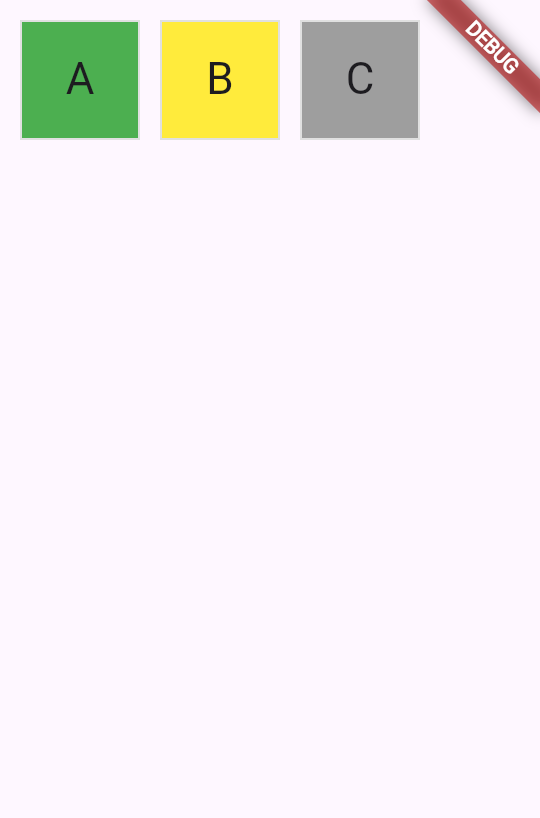
要在 UI 中實現這一點,請使用 switch 表達式
來設定 BoxDecoration 的 color。
class Tile extends StatelessWidget {
const Tile(this.letter, this.hitType, {super.key});
final String letter;
final HitType hitType;
@override
Widget build(BuildContext context) {
return Container(
width: 60,
height: 60,
decoration: BoxDecoration(
border: Border.all(color: Colors.grey.shade300),
color: switch (hitType) {
HitType.hit => Colors.green,
HitType.partial => Colors.yellow,
HitType.miss => Colors.grey,
_ => Colors.white,
},
// TODO: add children
),
);
}
}
6
子元件
子元件
最後,將 Center 和 Text 元件加入 Container.child 屬性。
Flutter SDK 中大多數元件都有 child 或 children 屬性,
分別用來接收單一元件或元件列表。
在你自己的自訂元件中使用相同的命名慣例是最佳實踐。
class Tile extends StatelessWidget {
const Tile(this.letter, this.hitType, {super.key});
final String letter;
final HitType hitType;
@override
Widget build(BuildContext context) {
return Container(
width: 60,
height: 60,
decoration: BoxDecoration(
border: Border.all(color: Colors.grey.shade300),
color: switch (hitType) {
HitType.hit => Colors.green,
HitType.partial => Colors.yellow,
HitType.miss => Colors.grey,
_ => Colors.white,
},
),
child: Center(
child: Text(
letter.toUpperCase(),
style: Theme.of(context).textTheme.titleLarge,
),
),
);
}
}
熱重載後會出現一個綠色方塊。若要切換顏色,
請更新傳入 Tile 的 HitType 並熱重載:
// main.dart line ~16
// green
Tile('A', HitType.hit);
// grey
Tile('A', HitType.miss);
// yellow
Tile('A', HitType.partial);
不久之後,這個小方塊將成為畫面上眾多元件之一。在下一節課中, 你將開始建置遊戲格線本身。
7
回顧
回顧
你完成的事項
以下是你在本課中建置與學習的摘要。建立了自訂 StatelessWidget
你透過繼承 StatelessWidget 建立了新的 Tile 元件。 每個元件都有一個接受資料的建構子, 以及一個回傳其他元件的 build
方法。 這個模式是使用 Flutter 建置使用者介面的基礎。
透過建構子參數使元件可重複使用
透過接受 letter 和 hitType 作為建構子參數, 你的 Tile 元件可以顯示不同的內容和顏色。 透過建構子傳遞資料是建立靈活、可重複使用元件的方式。
使用 Container 和 BoxDecoration 為元件套用樣式
你使用 Container 設定元件的大小, 並使用 BoxDecoration 加入邊框和背景色。 然後為了依條件設定方格顏色, 你對 hitType
值使用了 switch 表達式。
8
自我測驗
自我測驗
元件基礎測驗
1 / 2-
表示成功或失敗的布林值。
Not quite
元件不表示成功與否;它們回傳其他元件以進行渲染(render)。
-
若沒有內容要顯示則回傳 Null。
Not quite
`build` 方法不能回傳 null;它必須回傳一個有效的元件。
-
描述元件的 String。
Not quite
`build` 方法回傳的是元件,而不是 String。
-
另一個元件。
That's right!
`build` 方法永遠回傳另一個元件,構成元件樹的一部分。
-
TextStyle
Not quite
TextStyle 用於文字格式,而非容器裝飾。
-
ThemeData
Not quite
ThemeData 用於全應用程式範圍的樣式,而非個別容器的裝飾。
-
EdgeInsets
Not quite
EdgeInsets 用於指定內距(padding)或外距,而非視覺裝飾。
-
BoxDecoration
That's right!
BoxDecoration 可以為 Container 加入邊框、背景色、漸層、陰影等裝飾。
Unless stated otherwise, the documentation on this site reflects Flutter 3.44.0. Page last updated on 2026-06-14. View source or report an issue.