樂觀狀態(Optimistic state)
透過實作樂觀狀態,提升應用程式的響應式體驗。
在建立使用者體驗時, 效能的「感知」有時和實際程式碼效能一樣重要。 一般來說,使用者不喜歡等待動作完成才看到結果, 而任何超過幾毫秒的延遲,從使用者角度來看,都可能被認為是「慢」或「沒有回應」。
開發者可以透過在背景任務尚未完全完成前, 先呈現成功的 UI 狀態,來減輕這種負面感受。 例如,當點擊「訂閱」按鈕時, 即使背景的訂閱 API 呼叫尚在執行, 也能立即將按鈕狀態變為「已訂閱」。
這種技巧稱為樂觀狀態 (Optimistic State)、樂觀 UI (Optimistic UI) 或 樂觀使用者體驗 (Optimistic User Experience)。 在本教學中, 你將會使用樂觀狀態來實作一個應用程式功能, 並遵循 Flutter 架構指引。
範例功能:訂閱按鈕
#這個範例實作了一個訂閱按鈕, 類似於你在影音串流應用程式或電子報中會看到的設計。
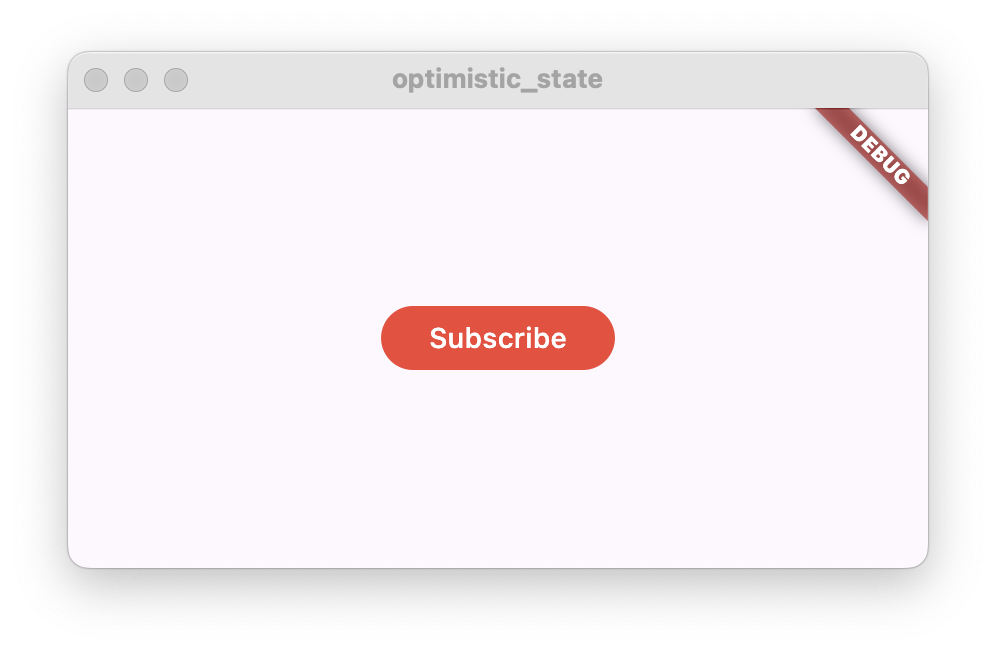
當按鈕被點擊時,應用程式會呼叫外部 API, 執行訂閱動作, 例如在資料庫中記錄該使用者已加入訂閱名單。 為了示範,本範例不會實作實際的後端程式碼, 而是用一個假的動作來模擬網路請求。
如果呼叫成功, 按鈕文字會從「Subscribe」變成「Subscribed」, 按鈕背景顏色也會改變。

相反地,如果呼叫失敗, 按鈕文字應該恢復為「Subscribe」, 並且 UI 會顯示錯誤訊息給使用者, 例如使用 Snackbar。
根據樂觀狀態的概念, 按鈕在被點擊時應立即變為「Subscribed」, 只有在請求失敗時才恢復為「Subscribe」。
功能架構
#首先,請定義此功能的架構。 依照架構指引, 在 Flutter 專案中建立以下 Dart 類別:
- 一個名為
SubscribeButton的StatefulWidget - 一個繼承自
ChangeNotifier的SubscribeButtonViewModel類別 - 一個名為
SubscriptionRepository的類別
class SubscribeButton extends StatefulWidget {
const SubscribeButton({super.key});
@override
State<SubscribeButton> createState() => _SubscribeButtonState();
}
class _SubscribeButtonState extends State<SubscribeButton> {
@override
Widget build(BuildContext context) {
return const Placeholder();
}
}
class SubscribeButtonViewModel extends ChangeNotifier {}
class SubscriptionRepository {}
SubscribeButton 元件 (Widget) 和 SubscribeButtonViewModel 代表此解決方案的呈現層(presentation layer)。
該元件 (Widget) 會顯示一個按鈕,根據訂閱狀態顯示文字「Subscribe」或「Subscribed」。
ViewModel 會包含訂閱狀態。
當按鈕被點擊時,元件 (Widget) 會呼叫 ViewModel 來執行動作。
SubscriptionRepository 會實作一個 subscribe 方法,當動作失敗時會拋出例外(exception)。
ViewModel 在執行訂閱動作時會呼叫此方法。
接下來,將它們串接起來,方法是將 SubscriptionRepository 加入到 SubscribeButtonViewModel 中:
class SubscribeButtonViewModel extends ChangeNotifier {
SubscribeButtonViewModel({required this.subscriptionRepository});
final SubscriptionRepository subscriptionRepository;
}
並將 SubscribeButtonViewModel 加到 SubscribeButton 元件 (Widget) 中:
class SubscribeButton extends StatefulWidget {
const SubscribeButton({super.key, required this.viewModel});
/// Subscribe button view model.
final SubscribeButtonViewModel viewModel;
@override
State<SubscribeButton> createState() => _SubscribeButtonState();
}
現在你已經建立了基本的解決方案架構,
接下來可以用以下方式建立 SubscribeButton 元件 (Widget):
SubscribeButton(
  viewModel: SubscribeButtonViewModel(
    subscriptionRepository: SubscriptionRepository(),
  ),
)
實作 SubscriptionRepository
#
在 SubscriptionRepository 中新增一個名為 subscribe() 的非同步方法,程式碼如下:
class SubscriptionRepository {
  /// Simulates a network request and then fails.
  Future<void> subscribe() async {
    // Simulate a network request
    await Future.delayed(const Duration(seconds: 1));
    // Fail after one second
    throw Exception('Failed to subscribe');
  }
}
對 await Future.delayed() 的呼叫,並設定為一秒的延遲,是用來模擬一個長時間執行的請求。
該方法的執行會暫停一秒,然後才會繼續執行。
為了模擬請求失敗的情境,subscribe 方法會在結尾拋出一個例外(exception)。
這會在後續實作樂觀狀態 (Optimistic State) 時,用來展示如何從失敗的請求中復原。
實作 SubscribeButtonViewModel
#
為了表示訂閱(subscription)的狀態,以及可能發生的錯誤狀態,請在 SubscribeButtonViewModel 中加入下列公開成員:
// Whether the user is subscribed
bool subscribed = false;
// Whether the subscription action has failed
bool error = false;
兩者在啟動時都會設為 false。
根據樂觀狀態 (Optimistic State) 的設計理念,
當使用者點擊訂閱按鈕時,subscribed 狀態會立即變更為 true。
只有在操作失敗時,才會再變回 false。
當操作失敗時,error 狀態會變更為 true,
這會通知 SubscribeButton 元件 (Widget) 向使用者顯示錯誤訊息。
當錯誤訊息顯示完畢後,該變數應該回復為 false。
接下來,實作一個非同步的 subscribe() 方法:
// Subscription action
Future<void> subscribe() async {
// Ignore taps when subscribed
if (subscribed) {
return;
}
// Optimistic state.
// It will be reverted if the subscription fails.
subscribed = true;
// Notify listeners to update the UI
notifyListeners();
try {
await subscriptionRepository.subscribe();
} catch (e) {
print('Failed to subscribe: $e');
// Revert to the previous state
subscribed = false;
// Set the error state
error = true;
} finally {
notifyListeners();
}
}
如前所述,該方法首先將 subscribed 狀態設為 true,然後呼叫 notifyListeners()。
這會強制 UI 更新,按鈕的外觀也會改變,向使用者顯示「Subscribed」文字。
接著,該方法會執行實際對 repository 的呼叫。
這個呼叫會被 try-catch 包裹,以捕捉可能拋出的任何例外。
如果捕捉到例外,則會將 subscribed 狀態設回 false,並將 error 狀態設為
true。
最後再呼叫 notifyListeners(),將 UI 變回「Subscribe」。
如果沒有發生例外,流程就已完成,因為 UI 已經反映了成功狀態。
完整的 SubscribeButtonViewModel 應如下所示:
/// Subscribe button View Model.
/// Handles the subscribe action and exposes the state to the subscription.
class SubscribeButtonViewModel extends ChangeNotifier {
SubscribeButtonViewModel({required this.subscriptionRepository});
final SubscriptionRepository subscriptionRepository;
// Whether the user is subscribed
bool subscribed = false;
// Whether the subscription action has failed
bool error = false;
// Subscription action
Future<void> subscribe() async {
// Ignore taps when subscribed
if (subscribed) {
return;
}
// Optimistic state.
// It will be reverted if the subscription fails.
subscribed = true;
// Notify listeners to update the UI
notifyListeners();
try {
await subscriptionRepository.subscribe();
} catch (e) {
print('Failed to subscribe: $e');
// Revert to the previous state
subscribed = false;
// Set the error state
error = true;
} finally {
notifyListeners();
}
}
}
實作 SubscribeButton
#
在這個步驟中,
你將先實作 SubscribeButton 的 build 方法,
接著實作此功能的錯誤處理。
請將以下程式碼新增到 build 方法中:
@override
Widget build(BuildContext context) {
  return ListenableBuilder(
    listenable: widget.viewModel,
    builder: (context, _) {
      return FilledButton(
        onPressed: widget.viewModel.subscribe,
        style: widget.viewModel.subscribed
            ? SubscribeButtonStyle.subscribed
            : SubscribeButtonStyle.unsubscribed,
        child: widget.viewModel.subscribed
            ? const Text('Subscribed')
            : const Text('Subscribe'),
      );
    },
  );
}
這個 build 方法包含一個 ListenableBuilder,
它會監聽來自 view model 的變化。
接著,builder 會建立一個 FilledButton,
根據 view model 的狀態顯示「Subscribed」或「Subscribe」文字。
按鈕的樣式也會依據這個狀態而改變。
此外,當按鈕被點擊時,
它會執行 view model 中的 subscribe() 方法。
SubscribeButtonStyle 可以在這裡找到。
請將這個 class 加在 SubscribeButton 旁邊。
你可以自由修改 ButtonStyle。
class SubscribeButtonStyle {
static const unsubscribed = ButtonStyle(
backgroundColor: WidgetStatePropertyAll(Colors.red),
);
static const subscribed = ButtonStyle(
backgroundColor: WidgetStatePropertyAll(Colors.green),
);
}
如果你現在執行應用程式, 你會看到按鈕在被按下時會改變, 但它會在沒有顯示錯誤的情況下回復到原本的狀態。
錯誤處理
#
為了處理錯誤,
請在 SubscribeButtonState 中加入 initState() 和 dispose()
方法,
然後再加入 _onViewModelChange() 方法。
@override
void initState() {
super.initState();
widget.viewModel.addListener(_onViewModelChange);
}
@override
void dispose() {
widget.viewModel.removeListener(_onViewModelChange);
super.dispose();
}
/// Listen to ViewModel changes.
void _onViewModelChange() {
  // If the subscription action has failed
  if (widget.viewModel.error) {
    // Reset the error state
    widget.viewModel.error = false;
    // Show an error message
    ScaffoldMessenger.of(
      context,
    ).showSnackBar(const SnackBar(content: Text('Failed to subscribe')));
  }
}
addListener() 呼叫會註冊 _onViewModelChange() 方法,
當 view model 通知監聽者時會被呼叫。
當元件 (Widget) 被銷毀時,務必呼叫 removeListener(),
以避免產生錯誤。
_onViewModelChange() 方法會檢查 error 狀態,
如果為 true,
則會向使用者顯示 Snackbar,以顯示錯誤訊息。
同時,error 狀態會被設回 false,
以避免當 view model 再次呼叫 notifyListeners() 時
重複顯示錯誤訊息。
進階樂觀狀態
#在本教學中, 你已學會如何以單一二元狀態實作樂觀狀態 (Optimistic State), 但你也可以透過加入第三個暫時性狀態, 來建立更進階的解決方案, 用以表示該動作仍在執行中。
例如,在聊天應用程式中,當使用者傳送新訊息時, 應用程式會在聊天視窗中顯示新的聊天訊息, 但會加上一個圖示,表示該訊息仍待傳送。 當訊息成功傳送後,該圖示就會被移除。
在訂閱按鈕的範例中,
你可以在 view model 中新增一個旗標,
用來表示 subscribe() 方法仍在執行中,
或是使用 Command pattern 的執行狀態,
然後稍微修改按鈕樣式,以顯示操作正在進行。
互動範例
#
此範例展示了 SubscribeButton 元件 (Widget),
搭配 SubscribeButtonViewModel
以及 SubscriptionRepository,
共同實作具有樂觀狀態 (Optimistic State) 的訂閱點擊動作。
當你點擊按鈕時, 按鈕文字會從「Subscribe」變為「Subscribed」。一秒後, repository 會拋出例外, 該例外會被 view model 捕捉, 按鈕會恢復顯示「Subscribe」, 同時顯示帶有錯誤訊息的 Snackbar。
// ignore_for_file: avoid_print

import 'package:flutter/material.dart';

void main() {
  runApp(const MyApp());
}

class MyApp extends StatelessWidget {
  const MyApp({super.key});

  // This widget is the root of your application.
  @override
  Widget build(BuildContext context) {
    return MaterialApp(
      home: Scaffold(
        body: Center(
          child: SubscribeButton(
            viewModel: SubscribeButtonViewModel(
              subscriptionRepository: SubscriptionRepository(),
            ),
          ),
        ),
      ),
    );
  }
}

/// A button that simulates a subscription action.
/// For example, subscribing to a newsletter or a streaming channel.
class SubscribeButton extends StatefulWidget {
  const SubscribeButton({super.key, required this.viewModel});

  /// Subscribe button view model.
  final SubscribeButtonViewModel viewModel;

  @override
  State<SubscribeButton> createState() => _SubscribeButtonState();
}

class _SubscribeButtonState extends State<SubscribeButton> {
  @override
  void initState() {
    super.initState();
    widget.viewModel.addListener(_onViewModelChange);
  }

  @override
  void dispose() {
    widget.viewModel.removeListener(_onViewModelChange);
    super.dispose();
  }

  @override
  Widget build(BuildContext context) {
    return ListenableBuilder(
      listenable: widget.viewModel,
      builder: (context, _) {
        return FilledButton(
          onPressed: widget.viewModel.subscribe,
          style: widget.viewModel.subscribed
              ? SubscribeButtonStyle.subscribed
              : SubscribeButtonStyle.unsubscribed,
          child: widget.viewModel.subscribed
              ? const Text('Subscribed')
              : const Text('Subscribe'),
        );
      },
    );
  }

  /// Listen to ViewModel changes.
  void _onViewModelChange() {
    // If the subscription action has failed
    if (widget.viewModel.error) {
      // Reset the error state
      widget.viewModel.error = false;
      // Show an error message
      ScaffoldMessenger.of(
        context,
      ).showSnackBar(const SnackBar(content: Text('Failed to subscribe')));
    }
  }

}

class SubscribeButtonStyle {
  static const unsubscribed = ButtonStyle(
    backgroundColor: WidgetStatePropertyAll(Colors.red),
  );

  static const subscribed = ButtonStyle(
    backgroundColor: WidgetStatePropertyAll(Colors.green),
  );
}

/// Subscribe button View Model.
/// Handles the subscribe action and exposes the state to the subscription.
class SubscribeButtonViewModel extends ChangeNotifier {
  SubscribeButtonViewModel({required this.subscriptionRepository});

  final SubscriptionRepository subscriptionRepository;

  // Whether the user is subscribed
  bool subscribed = false;

  // Whether the subscription action has failed
  bool error = false;

  // Subscription action
  Future<void> subscribe() async {
    // Ignore taps when subscribed
    if (subscribed) {
      return;
    }

    // Optimistic state.
    // It will be reverted if the subscription fails.
    subscribed = true;
    // Notify listeners to update the UI
    notifyListeners();

    try {
      await subscriptionRepository.subscribe();
    } catch (e) {
      print('Failed to subscribe: $e');
      // Revert to the previous state
      subscribed = false;
      // Set the error state
      error = true;
    } finally {
      notifyListeners();
    }
  }

}

/// Repository of subscriptions.
class SubscriptionRepository {
  /// Simulates a network request and then fails.
  Future<void> subscribe() async {
    // Simulate a network request
    await Future.delayed(const Duration(seconds: 1));
    // Fail after one second
    throw Exception('Failed to subscribe');
  }
}Unless stated otherwise, the documentation on this site reflects Flutter 3.44.0. Page last updated on 2026-06-14. View source or report an issue.