# Flutter 的字型與排版
> 了解 Flutter 對於排版的支援。
[_Typography_][] 指的是字體或字型的風格與外觀:它規範了字型的粗細、傾斜度、字母間距,以及文字的其他視覺屬性。
所有字型並非都相同。
一種字型風格至少由字型家族(typeface)定義,這代表同一字型家族下描述字型的共同字元規則,例如 **Roboto** 或 **Noto**,還有字重(font weight,例如 Regular、Bold 或數值),以及樣式(如 Regular、_Italic_ 等)。這些屬性與其他預設屬性組合起來,就形成了我們所稱的靜態字型(static font)。
可變字型(Variable fonts)允許在執行時修改這些屬性中的部分,並將原本需多個靜態字型檔案才能實現的設計,整合於單一檔案中。
[_Typography_]: https://en.wikipedia.org/wiki/Typography
## 排版比例(Typographic Scale)
排版比例是一組相關的文字樣式,用來在應用程式中提供平衡、一致性與視覺多樣性。
Flutter 中常見的字型比例,由 [`TextTheme`][] 提供,包含五大類型,分別代表不同的功能:
* Display
* Headline
* Title
* Label
* Body
每一類型又有三種尺寸變化:
* Small
* Medium
* Large
這五類與三種尺寸的十五種組合,各自對應一個 [`TextStyle`][]。
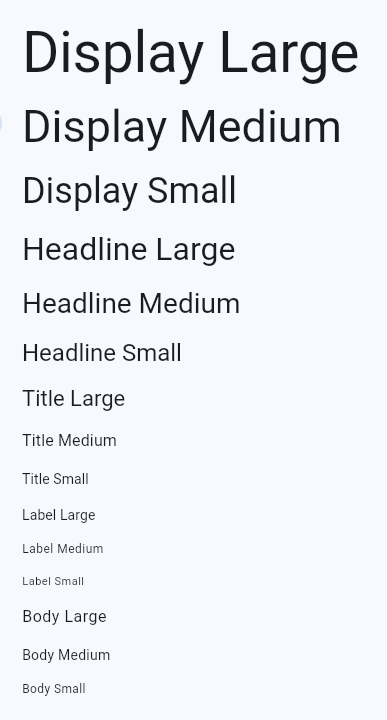 Flutter 所提供的所有平台專屬排版比例,皆包含於 [`Typography`][] 類別中。通常你不需要直接參考這個類別,因為 `TextTheme` 會根據目標平台自動在地化。
[`TextTheme`]: https://pub.dev/documentation/material_ui/latest/material_ui/TextTheme-class.html
[`TextStyle`]: https://api.flutter.dev/flutter/painting/TextStyle-class.html
[`Typography`]: https://pub.dev/documentation/material_ui/latest/material_ui/Typography-class.html
## 可變字型(Variable fonts)
[可變字型(Variable fonts)][Variable fonts]
讓你可以控制文字樣式中預先定義的屬性。
可變字型支援特定的軸,例如寬度、字重、傾斜度(僅舉幾項)。
使用者在指定字型時,可以選擇 _軸上的任意連續值_。
[Variable fonts]: https://fonts.google.com/knowledge/introducing_type/introducing_variable_fonts
### 使用 Google Fonts 的 Type Tester
越來越多 Google Fonts 上的字型支援可變字型功能。
你可以透過 Type Tester 查看可調整的範圍,並觀察單一字型的多樣變化。
 即時拖曳任一軸的滑桿,即可看到字型的變化。當你在程式中使用可變字型時,可以利用 [`FontVariation`][] 類別來調整字型的設計軸。
`FontVariation` 類別則遵循
[OpenType font variables 規範][OpenType font variables spec]。
[`FontVariation`]: https://api.flutter.dev/flutter/dart-ui/FontVariation-class.html
[Google Fonts]: https://fonts.google.com/
[OpenType font variables spec]: https://learn.microsoft.com/en-us/typography/opentype/spec/otvaroverview
## 靜態字型(Static fonts)
Google Fonts 也提供靜態字型。和可變字型一樣,你需要了解該字型的設計,才能知道有哪些可用選項。
同樣地,Google Fonts 網站可以協助你查詢。
### 使用 Google Fonts 套件
雖然你可以從網站下載字型並手動安裝到應用程式中,
但你也可以直接透過 [google_fonts][] 套件,在 [pub.dev][] 上使用。
你只需引用字型名稱,即可直接使用:
```dart
Text(
'This is Google Fonts',
style: GoogleFonts.lato(),
),
```
或是透過設定產生出的 `TextStyle` 的屬性來自訂:
```dart
Text(
'This is Google Fonts',
style: GoogleFonts.lato(
textStyle: Theme.of(context).textTheme.displayLarge,
fontSize: 48,
fontWeight: FontWeight.w700,
fontStyle: FontStyle.italic,
),
),
```
### 修改字型
可使用以下 API 以程式化方式修改靜態字型
(但請注意,這僅適用於該字型在設計時就 _支援_ 該功能的情況):
* [`FontFeature`][] 用於選擇字形(glyphs)
* [`FontWeight`][] 用於修改字重(weight)
* [`FontStyle`][] 用於斜體(italicize)
* [`FontVariation`][] 用於指定特定屬性的數值範圍。
`FontFeature` 對應於一個 [OpenType 功能標籤(feature tag)][OpenType feature tag],
可以視為一個布林旗標,用來啟用或停用
指定字型的某個功能。
[`FontFeature`]: https://api.flutter.dev/flutter/dart-ui/FontFeature-class.html
[`FontStyle`]: https://api.flutter.dev/flutter/dart-ui/FontStyle.html
[`FontWeight`]: https://api.flutter.dev/flutter/dart-ui/FontWeight-class.html
[OpenType feature tag]: https://learn.microsoft.com/en-us/typography/opentype/spec/featuretags
[pub.dev]: https://pub.dev
[google_fonts]: https://pub.dev/packages/google_fonts
## 其他資源
以下影片展示了 Flutter 字體排版(typography)的一些功能,
並結合了 Material _與_ Cupertino 的外觀與操作體驗(依應用程式運行的平台而定)、動畫(Animation)以及自訂片段著色器(fragment shaders):
若想了解一位工程師
自訂可變字型並在變形過程中進行動畫(這也是上述影片的基礎),
請參考 [Playful typography with Flutter][article],
這是一篇 Flutter 部落格文章。相關範例同樣使用了自訂著色器(shader)。
[article]: https://blog.flutter.dev/playful-typography-with-flutter-f030385058b4