# 採用 UIScene
> 了解如何將您的 Flutter iOS 應用程式、加入應用程式(add-to-app)整合或插件 遷移至 Apple 要求的 UIScene 生命週期。
:::important
這些重大變更文件在其發布的版本時是準確的。隨著時間推移,這裡描述的
因應措施可能會變得不準確。一般而言,我們不會在每個版本發布時同步更新這些重大變更文件。
[重大變更索引檔案](/release/breaking-changes)列出了每個版本所建立的文件。
:::
:::important
自 Flutter 3.41 發布起,
`UIScene` 支援已成為 iOS 應用程式的預設設定,
符合條件的應用程式將自動完成遷移。
:::
:::version-note
從 Xcode 27(iOS 27 SDK)開始,Apple 強制要求 UIKit 應用程式
使用 `UIScene` 生命週期。使用 Xcode 27 建置但
未採用 `UIScene` 的 Flutter 應用程式,將在啟動時失敗。
在 Flutter 3.41 及更新版本中,如果您的專案使用未經修改的 `AppDelegate`,
Flutter 會自動進行遷移。如果您的專案使用自訂的 `AppDelegate`
或 3.41 之前的 Flutter 版本,請完成以下手動遷移步驟。
:::
## 摘要
Apple 現在要求 iOS 開發者採用 `UIScene` 生命週期。
此遷移對[應用程式啟動序列][app launch sequence]及[應用程式生命週期][app lifecycle]均有影響。
[app launch sequence]: https://developer.apple.com/documentation/uikit/about-the-app-launch-sequence
[app lifecycle]: https://developer.apple.com/documentation/uikit/managing-your-app-s-life-cycle
## 背景
在 WWDC25 期間,Apple [宣布][uiscene-announcement]了以下內容:
> 在 iOS 26 之後的版本中,任何使用最新 SDK 建置的 UIKit 應用程式
> 都必須使用 UIScene 生命週期,否則將無法啟動。
若要採用 `UIScene` 生命週期,
請依照符合您使用情境的指南進行操作:
* 針對所有支援 iOS 的 Flutter 應用程式,
請遵循 [Flutter 應用程式的遷移指南][migration guide for Flutter apps]。
* 針對嵌入至現有原生 iOS 應用程式的 Flutter 應用程式,
請遵循[加入應用程式的遷移指南][migration guide for add-to-app]。
* 針對使用 iOS 應用程式生命週期事件的 Flutter 插件,
請遵循 [Flutter 插件的遷移指南][migration guide for Flutter plugins]。
遷移至 `UIScene` 會改變 `AppDelegate` 的職責:
`UISceneDelegate` 現在負責處理 UI 生命週期,
而 `AppDelegate` 仍負責處理程序事件及整體應用程式生命週期。
請將所有與 UI 相關的邏輯從 `AppDelegate` 移至
對應的 `UISceneDelegate` 方法中。
遷移至 `UIScene` 後,UIKit 將不再
呼叫與 UI 狀態相關的 `AppDelegate` 方法。
[uiscene-announcement]: https://developer.apple.com/videos/play/wwdc2025/243/?time=1317
[migration guide for Flutter apps]: #migrate-a-flutter-app
[migration guide for add-to-app]: #migrate-an-add-to-app-integration
[migration guide for Flutter plugins]: #migrate-a-flutter-plugin
## 遷移 Flutter 應用程式
### 自動遷移
自 Flutter 3.41 起,預設支援 `UIScene`。
如果您的 `AppDelegate` 尚未經過自訂,
Flutter CLI 將自動遷移您的應用程式。
若要觸發遷移,請使用
`flutter run` 或 `flutter build ios` 指令建置或執行您的應用程式。
若遷移成功,
CLI 將輸出 `Finished migration to UIScene lifecycle`,
無需進一步操作。
否則,CLI 將發出警告並
提供手動遷移的操作說明。
### 遷移 AppDelegate
以往,Flutter 插件是在
`application:didFinishLaunchingWithOptions:` 中註冊的。
為了配合新的應用程式啟動序列,
您現在必須在新的 `didInitializeImplicitFlutterEngine` 回呼(callback)中註冊插件。
1. 讓您的 `AppDelegate` 遵循 `FlutterImplicitEngineDelegate`
協定,並將 `GeneratedPluginRegistrant` 的註冊移至
`didInitializeImplicitFlutterEngine`。
```swift title="my_app/ios/Runner/AppDelegate.swift" diff
- @objc class AppDelegate: FlutterAppDelegate {
+ @objc class AppDelegate: FlutterAppDelegate, FlutterImplicitEngineDelegate {
override func application(
_ application: UIApplication,
didFinishLaunchingWithOptions launchOptions: [UIApplication.LaunchOptionsKey: Any]?
) -> Bool {
- GeneratedPluginRegistrant.register(with: self)
return super.application(application, didFinishLaunchingWithOptions: launchOptions)
}
+ func didInitializeImplicitFlutterEngine(_ engineBridge: FlutterImplicitEngineBridge) {
+ GeneratedPluginRegistrant.register(with: engineBridge.pluginRegistry)
+ }
}
```
```objc title="my_app/ios/Runner/AppDelegate.h" diff
- @interface AppDelegate : FlutterAppDelegate
+ @interface AppDelegate : FlutterAppDelegate
```
```objc title="my_app/ios/Runner/AppDelegate.m" diff
- (BOOL)application:(UIApplication *)application
didFinishLaunchingWithOptions:(NSDictionary *)launchOptions {
- [GeneratedPluginRegistrant registerWithRegistry:self];
return [super application:application didFinishLaunchingWithOptions:launchOptions];
}
+ - (void)didInitializeImplicitFlutterEngine:(NSObject*)engineBridge {
+ [GeneratedPluginRegistrant registerWithRegistry:engineBridge.pluginRegistry];
+ }
```
1. 如有需要,在 `didInitializeImplicitFlutterEngine` 中建立方法通道與平台視圖。
如果您之前在 `application:didFinishLaunchingWithOptions:` 中
建立了[方法通道][method channels]或[平台視圖][platform views],
請將該邏輯移至 `didInitializeImplicitFlutterEngine`。
```swift
func didInitializeImplicitFlutterEngine(_ engineBridge: FlutterImplicitEngineBridge) {
// Register plugins with `engineBridge.pluginRegistry`:
GeneratedPluginRegistrant.register(with: engineBridge.pluginRegistry)
// Create method channels with `engineBridge.applicationRegistrar.messenger()`:
let batteryChannel = FlutterMethodChannel(
name: "samples.flutter.dev/battery",
binaryMessenger: engineBridge.applicationRegistrar.messenger()
)
// Create platform views with `engineBridge.applicationRegistrar.messenger()`:
let factory = FLNativeViewFactory(messenger: engineBridge.applicationRegistrar.messenger())
}
```
```objc
- (void)didInitializeImplicitFlutterEngine:(NSObject*)engineBridge {
// Register plugins with `engineBridge.pluginRegistry`:
[GeneratedPluginRegistrant registerWithRegistry:engineBridge.pluginRegistry];
// Create method channels with `engineBridge.applicationRegistrar.messenger`:
FlutterMethodChannel* batteryChannel = [FlutterMethodChannel
methodChannelWithName:@"samples.flutter.dev/battery"
binaryMessenger:engineBridge.applicationRegistrar.messenger];
// Create platform views with `engineBridge.applicationRegistrar.messenger`:
FLNativeViewFactory* factory =
[[FLNativeViewFactory alloc] initWithMessenger:engineBridge.applicationRegistrar.messenger];
}
```
:::warning
如果您嘗試在
`application:didFinishLaunchingWithOptions:` 中存取 `FlutterViewController`,
您的應用程式可能會崩潰。
請改用 `FlutterImplicitEngineDelegate` 協定。
```swift
// BAD
let controller: FlutterViewController = window?.rootViewController as! FlutterViewController
```
若要直接存取 `FlutterViewController`,
請參閱[自訂 FlutterViewController 的使用方式][Bespoke FlutterViewController usage]。
:::
1. 遷移應用程式生命週期事件中的所有自訂邏輯。
Apple 已棄用與 UI 狀態相關的應用程式生命週期事件。
遷移至 `UIScene` 生命週期後,
UIKit 將不再呼叫這些事件。
如果您使用了其中某個已棄用的 API,
例如 [`applicationDidBecomeActive`][],
您可能需要建立 `SceneDelegate` 並
遷移至 Scene 生命週期事件。
若要深入了解,請參閱 Apple 關於遷移的[官方文件][Apple's documentation]。
如果您實作了自己的 `SceneDelegate`,
則必須繼承 `FlutterSceneDelegate` 或
遵循 `FlutterSceneLifeCycleProvider` 協定。
如需範例,請參閱[建立或更新 SceneDelegate][Create or update a SceneDelegate]。
[method channels]: /platform-integration/platform-channels
[platform views]: /platform-integration/ios/platform-views
[Bespoke FlutterViewController usage]: #bespoke-flutterviewcontroller-usage
[`applicationDidBecomeActive`]: https://developer.apple.com/documentation/uikit/uiapplicationdelegate/applicationdidbecomeactive
[Apple's documentation]: https://developer.apple.com/documentation/technotes/tn3187-migrating-to-the-uikit-scene-based-life-cycle
[Create or update a SceneDelegate]: #create-or-update-a-scenedelegate
### 遷移 Info.plist
若要完成遷移至 `UIScene` 生命週期,
請在您的 `Info.plist` 中加入 **Application Scene Manifest** 項目。
如 Xcode 編輯器中所示:
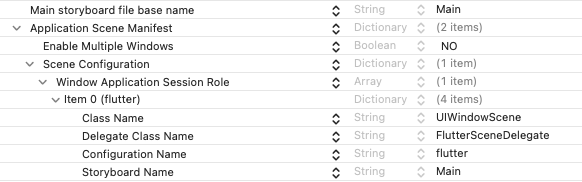
以 XML 格式呈現:
```xml title="Info.plist"
UIApplicationSceneManifest
UIApplicationSupportsMultipleScenes
UISceneConfigurations
UIWindowSceneSessionRoleApplication
UISceneClassName
UIWindowScene
UISceneDelegateClassName
FlutterSceneDelegate
UISceneConfigurationName
flutter
UISceneStoryboardFile
Main
```
### 建立 SceneDelegate(選用)
如果您需要存取 `SceneDelegate`,
可以透過繼承 `FlutterSceneDelegate` 來建立:
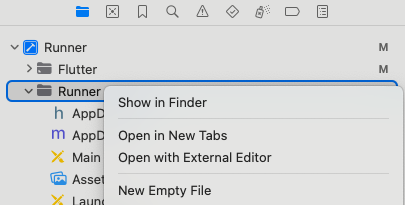
1. 在 Xcode 中開啟您的應用程式。
1. 在 **Runner** 資料夾上按右鍵,然後選擇 **New Empty File**。
1. 建立您的 `SceneDelegate` 類別。
對於 Swift 專案,
建立一個 `SceneDelegate.swift` 檔案:
```swift title="my_app/ios/Runner/SceneDelegate.swift"
import Flutter
import UIKit
class SceneDelegate: FlutterSceneDelegate {}
```
對於 Objective-C 專案,
建立 `SceneDelegate.h` 及 `SceneDelegate.m` 檔案:
```objc title="my_app/ios/Runner/SceneDelegate.h"
#import
#import
@interface SceneDelegate : FlutterSceneDelegate
@end
```
```objc title="my_app/ios/Runner/SceneDelegate.m"
#import "SceneDelegate.h"
@implementation SceneDelegate
@end
```
1. 在您的 `Info.plist` 檔案中,
將 **Delegate Class Name**(`UISceneDelegateClassName`)的值
從 `FlutterSceneDelegate` 更改為您的新類別名稱。
對於 Swift 專案,使用 `$(PRODUCT_MODULE_NAME).SceneDelegate`:
```xml title="Info.plist" highlightLines=10-11
UIApplicationSceneManifest
UISceneConfigurations
UIWindowSceneSessionRoleApplication
UISceneDelegateClassName
$(PRODUCT_MODULE_NAME).SceneDelegate
```
對於 Objective-C 專案,使用 `SceneDelegate`:
```xml title="Info.plist" highlightLines=10-11
UIApplicationSceneManifest
UISceneConfigurations
UIWindowSceneSessionRoleApplication
UISceneDelegateClassName
SceneDelegate
```
## 遷移加入應用程式(add-to-app)整合
與 `FlutterAppDelegate` 類似,
`FlutterSceneDelegate` 建議使用但非強制。
`FlutterSceneDelegate` 會將 Scene 的回呼(callback)轉發,
例如將 [`openURL`][] 轉發給 [`local_auth`][] 等插件。
[`openURL`]: https://developer.apple.com/documentation/uikit/uiapplicationdelegate/1623112-application
[`local_auth`]: https://pub.dev/packages/local_auth
### 建立或更新 SceneDelegate
```swift diff
import UIKit
+ import Flutter
- class SceneDelegate: UIResponder, UIWindowSceneDelegate {
+ class SceneDelegate: FlutterSceneDelegate {
```
```objc diff
- @interface SceneDelegate : UIResponder
+ @interface SceneDelegate : FlutterSceneDelegate
```
在 SwiftUI 應用程式中使用 Flutter 時,
您可以[選擇性地使用 `FlutterAppDelegate`][flutter-app-delegate]
來接收應用程式事件。
若要將其遷移以接收 `UIScene` 事件,
請進行以下變更:
1. 在 `application:configurationForConnecting:options:` 中
將 Scene delegate 設定為 `FlutterSceneDelegate`:
```swift diff
@Observable
class AppDelegate: FlutterAppDelegate {
...
+ override func application(
+ _ application: UIApplication,
+ configurationForConnecting connectingSceneSession: UISceneSession,
+ options: UIScene.ConnectionOptions
+ ) -> UISceneConfiguration {
+ let configuration = UISceneConfiguration(
+ name: nil,
+ sessionRole: connectingSceneSession.role
+ )
+ configuration.delegateClass = FlutterSceneDelegate.self
+ return configuration
+ }
}
```
1. 如果您的應用程式不支援多個 Scene,
請在目標的 Info 屬性中,
於 **Application Scene Manifest** 下將 **Enable Multiple Scenes** 設定為 **NO**。
SwiftUI 應用程式預設啟用多 Scene 支援。
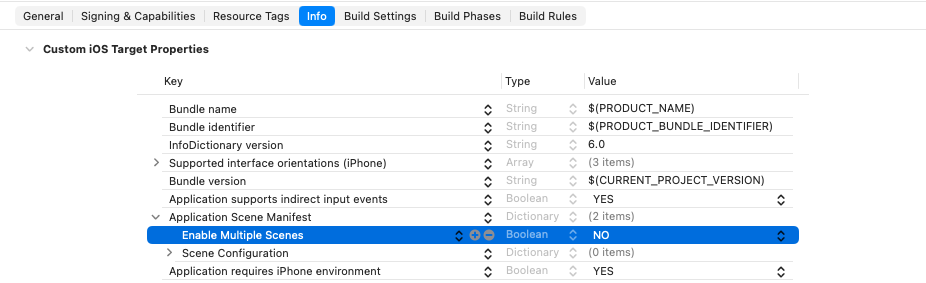
如果您的應用程式確實支援多個 Scene,
請參閱[若您的應用程式支援多個 Scene][If your app supports multiple scenes] 以取得進一步說明。
[flutter-app-delegate]: /add-to-app/ios/add-flutter-screen#using-the-flutterappdelegate
[If your app supports multiple scenes]: #if-your-app-supports-multiple-scenes
### 若您無法繼承 FlutterSceneDelegate
如果您無法繼承 `FlutterSceneDelegate`,
請使用 `FlutterSceneLifeCycleProvider` 協定與
`FlutterPluginSceneLifeCycleDelegate` 物件,
將 Scene 生命週期事件轉發給 Flutter。
```swift title="SceneDelegate.swift" diff
import Flutter
import UIKit
- class SceneDelegate: UIResponder, UIWindowSceneDelegate
+ class SceneDelegate: UIResponder, UIWindowSceneDelegate, FlutterSceneLifeCycleProvider
{
+ var sceneLifeCycleDelegate: FlutterPluginSceneLifeCycleDelegate =
+ FlutterPluginSceneLifeCycleDelegate()
var window: UIWindow?
func scene(
_ scene: UIScene,
willConnectTo session: UISceneSession,
options connectionOptions: UIScene.ConnectionOptions
) {
+ sceneLifeCycleDelegate.scene(
+ scene,
+ willConnectTo: session,
+ options: connectionOptions
+ )
}
func sceneDidDisconnect(_ scene: UIScene) {
+ sceneLifeCycleDelegate.sceneDidDisconnect(scene)
}
func sceneWillEnterForeground(_ scene: UIScene) {
+ sceneLifeCycleDelegate.sceneWillEnterForeground(scene)
}
func sceneDidBecomeActive(_ scene: UIScene) {
+ sceneLifeCycleDelegate.sceneDidBecomeActive(scene)
}
func sceneWillResignActive(_ scene: UIScene) {
+ sceneLifeCycleDelegate.sceneWillResignActive(scene)
}
func sceneDidEnterBackground(_ scene: UIScene) {
+ sceneLifeCycleDelegate.sceneDidEnterBackground(scene)
}
func scene(
_ scene: UIScene,
openURLContexts URLContexts: Set
) {
+ sceneLifeCycleDelegate.scene(scene, openURLContexts: URLContexts)
}
func scene(_ scene: UIScene, continue userActivity: NSUserActivity) {
+ sceneLifeCycleDelegate.scene(scene, continue: userActivity)
}
func windowScene(
_ windowScene: UIWindowScene,
performActionFor shortcutItem: UIApplicationShortcutItem,
completionHandler: @escaping (Bool) -> Void
) {
+ sceneLifeCycleDelegate.windowScene(
+ windowScene,
+ performActionFor: shortcutItem,
+ completionHandler: completionHandler
+ )
}
}
```
```objc title="SceneDelegate.h" diff
- @interface SceneDelegate : UIResponder
+ @interface SceneDelegate : UIResponder
@property(strong, nonatomic) UIWindow* window;
+ @property(nonatomic, strong) FlutterPluginSceneLifeCycleDelegate* sceneLifeCycleDelegate;
@end
```
```objc title="SceneDelegate.m" diff
@implementation SceneDelegate
- (instancetype)init {
if (self = [super init]) {
+ _sceneLifeCycleDelegate = [[FlutterPluginSceneLifeCycleDelegate alloc] init];
}
return self;
}
- (void)scene:(UIScene*)scene
willConnectToSession:(UISceneSession*)session
options:(UISceneConnectionOptions*)connectionOptions {
+ [self.sceneLifeCycleDelegate scene:scene willConnectToSession:session options:connectionOptions];
}
- (void)sceneDidDisconnect:(UIScene*)scene {
+ [self.sceneLifeCycleDelegate sceneDidDisconnect:scene];
}
- (void)sceneDidBecomeActive:(UIScene*)scene {
+ [self.sceneLifeCycleDelegate sceneDidBecomeActive:scene];
}
- (void)sceneWillResignActive:(UIScene*)scene {
+ [self.sceneLifeCycleDelegate sceneWillResignActive:scene];
}
- (void)sceneWillEnterForeground:(UIScene*)scene {
+ [self.sceneLifeCycleDelegate sceneWillEnterForeground:scene];
}
- (void)sceneDidEnterBackground:(UIScene*)scene {
+ [self.sceneLifeCycleDelegate sceneDidEnterBackground:scene];
}
- (void)scene:(UIScene*)scene openURLContexts:(NSSet*)URLContexts {
+ [self.sceneLifeCycleDelegate scene:scene openURLContexts:URLContexts];
}
- (void)scene:(UIScene*)scene continueUserActivity:(NSUserActivity*)userActivity {
+ [self.sceneLifeCycleDelegate scene:scene continueUserActivity:userActivity];
}
- (void)windowScene:(UIWindowScene*)windowScene
performActionForShortcutItem:(UIApplicationShortcutItem*)shortcutItem
completionHandler:(void (^)(BOOL))completionHandler {
+ [self.sceneLifeCycleDelegate windowScene:windowScene
+ performActionForShortcutItem:shortcutItem completionHandler:completionHandler];
}
```
### 若您的應用程式支援多個 Scene
Flutter 尚未完整支援多個 Scene,
但相關支援正在進行中。
## 遷移 Flutter 插件
並非所有插件都使用生命週期事件。
但如果您的插件有使用,
請依照以下步驟將其遷移至 UIKit 基於 Scene 的生命週期:
1. 在您的 `pubspec.yaml` 中更新 Dart 與 Flutter SDK 版本。
此遷移所需的 API 自 Flutter 3.38 起提供:
```yaml title="pubspec.yaml"
environment:
sdk: ^3.10.0
flutter: ">=3.38.0"
```
1. 採用 `FlutterSceneLifeCycleDelegate` 協定。
```swift diff
- public final class MyPlugin: NSObject, FlutterPlugin {
+ public final class MyPlugin: NSObject, FlutterPlugin, FlutterSceneLifeCycleDelegate {
```
```objc diff
- @interface MyPlugin : NSObject
+ @interface MyPlugin : NSObject
```
1. 將插件注冊為 `UISceneDelegate` 呼叫的接收者。
為了繼續支援尚未遷移至 `UIScene` 生命週期的應用程式,
建議保留對應用程式 delegate 的注冊,
並同時保留 `AppDelegate` 事件。
```swift diff
public static func register(with registrar: FlutterPluginRegistrar) {
...
registrar.addApplicationDelegate(instance)
+ registrar.addSceneDelegate(instance)
}
```
```objc diff
+ (void)registerWithRegistrar:(NSObject *)registrar {
...
[registrar addApplicationDelegate:instance];
+ [registrar addSceneDelegate:instance];
}
```
1. 加入您的插件所需的 Scene 事件。
大多數 `AppDelegate` UI 事件都有一對一的替代方案,
如下表所示。
如需每個事件的詳細資訊,請參閱 Apple 關於
[`UISceneDelegate`][] 和 [`UIWindowSceneDelegate`][] 的文件。
| App delegate 方法 | Scene delegate 對應方法 |
|:------------------------------------------------------------------|:------------------------------------------------------------------|
| [`applicationDidBecomeActive`][] | [`sceneDidBecomeActive`][] |
| [`applicationWillResignActive`][] | [`sceneWillResignActive`][] |
| [`applicationWillEnterForeground`][] | [`sceneWillEnterForeground`][] |
| [`applicationDidEnterBackground`][] | [`sceneDidEnterBackground`][] |
| [`application:continueUserActivity:restorationHandler:`][] | [`scene:continueUserActivity:`][] |
| [`application:performActionForShortcutItem:completionHandler:`][] | [`windowScene:performActionForShortcutItem:completionHandler:`][] |
| [`application:openURL:options:`][] | [`scene:openURLContexts:`][] |
| [`application:willFinishLaunchingWithOptions:`][] | [`scene:willConnectToSession:options:`][] |
| [`application:didFinishLaunchingWithOptions:`][] | [`scene:willConnectToSession:options:`][] |
{:.table}
一旦確認了替代應用程式事件的 Scene 事件,
請實作對應的 `FlutterSceneLifeCycleDelegate` 方法。
以下程式碼片段展示了 `FlutterSceneLifeCycleDelegate`
支援的每個 Scene 事件的簽名;
只需實作您的插件所需的部分。
```swift
public func scene(
_ scene: UIScene,
willConnectTo session: UISceneSession,
options connectionOptions: UIScene.ConnectionOptions?
) -> Bool { }
public func sceneDidDisconnect(_ scene: UIScene) { }
public func sceneWillEnterForeground(_ scene: UIScene) { }
public func sceneDidBecomeActive(_ scene: UIScene) { }
public func sceneWillResignActive(_ scene: UIScene) { }
public func sceneDidEnterBackground(_ scene: UIScene) { }
public func scene(
_ scene: UIScene,
openURLContexts URLContexts: Set
) -> Bool { }
public func scene(
_ scene: UIScene,
continue userActivity: NSUserActivity
) -> Bool { }
public func windowScene(
_ windowScene: UIWindowScene,
performActionFor shortcutItem: UIApplicationShortcutItem,
completionHandler: @escaping (Bool) -> Void
) -> Bool { }
```
```objc
- (BOOL)scene:(UIScene*)scene
willConnectToSession:(UISceneSession*)session
options:(nullable UISceneConnectionOptions*)connectionOptions { }
- (void)sceneDidDisconnect:(UIScene*)scene { }
- (void)sceneWillEnterForeground:(UIScene*)scene { }
- (void)sceneDidBecomeActive:(UIScene*)scene { }
- (void)sceneWillResignActive:(UIScene*)scene { }
- (void)sceneDidEnterBackground:(UIScene*)scene { }
- (BOOL)scene:(UIScene*)scene openURLContexts:(NSSet*)URLContexts { }
- (BOOL)scene:(UIScene*)scene continueUserActivity:(NSUserActivity*)userActivity { }
- (BOOL)windowScene:(UIWindowScene*)windowScene
performActionForShortcutItem:(UIApplicationShortcutItem*)shortcutItem
completionHandler:(void (^)(BOOL succeeded))completionHandler { }
```
1. 將啟動邏輯從 `application:willFinishLaunchingWithOptions:`
和 `application:didFinishLaunchingWithOptions:` 移至
`scene:willConnectToSession:options:`。
儘管 `application:willFinishLaunchingWithOptions:` 和
`application:didFinishLaunchingWithOptions:` 尚未被棄用,
但在遷移至 `UIScene` 生命週期後,其啟動選項將為 `nil`。
請將依賴啟動選項的任何邏輯移至
`scene:willConnectToSession:options:` 事件中。
1. 如果您的插件使用了必須在
`application:didFinishLaunchingWithOptions:` 完成之前呼叫的 API,
您應該公開一個公用方法,
讓應用程式開發者可以直接在其 AppDelegate 中呼叫。
以下 Apple API 必須在應用程式啟動完成之前設定:
- [`BGTaskScheduler.registerForTaskWithIdentifier:usingQueue:launchHandler:`][]
- [`UNUserNotificationCenterDelegate`][]
- [`HKHealthStore.enableBackgroundDeliveryForType:frequency:withCompletion:`][]
例如,若要支援 `BGTaskScheduler`:
```swift diff
// Plugin
public class BGTaskPlugin: NSObject, FlutterPlugin {
public static let shared = BGTaskPlugin()
public static func register(with registrar: FlutterPluginRegistrar) {
let channel = ...
registrar.addMethodCallDelegate(shared, channel: channel)
registrar.addApplicationDelegate(shared)
}
+ // A new API for apps to call in their `AppDelegate`'s `application:didFinishLaunchingWithOptions:`
+ public func registerBackgroundHandler(identifier: String) {
+ BGTaskScheduler.register(forTaskWithIdentifier: identifier, using: .main) { task in
+ // Handle background task execution
+ }
+ }
- public func application(_ application: UIApplication, didFinishLaunchingWithOptions launchOptions: [AnyHashable : Any] = [:]) -> Bool {
- BGTaskScheduler.register(forTaskWithIdentifier: identifier, using: .main) { task in
- // Handle background task execution
- }
- return true
- }
}
// App
class AppDelegate: FlutterAppDelegate {
override func application(
_ application: UIApplication,
didFinishLaunchingWithOptions launchOptions: [UIApplication.LaunchOptionsKey: Any]?
) -> Bool {
+ BGTaskPlugin.shared.registerBackgroundHandler(identifier: "com.example.task")
return super.application(application, didFinishLaunchingWithOptions: launchOptions)
}
}
```
```objc diff
// Plugin
@interface BGTaskPlugin : NSObject
+ + (instancetype)sharedInstance;
+ - (void)registerBackgroundHandlerWithIdentifier:(NSString *)identifier;
@end
@implementation BGTaskPlugin
+ + (instancetype)sharedInstance {
+ static BGTaskPlugin *sharedInstance = nil;
+ static dispatch_once_t onceToken;
+ dispatch_once(&onceToken, ^{
+ sharedInstance = [[BGTaskPlugin alloc] init];
+ });
+ return sharedInstance;
+ }
+ (void)registerWithRegistrar:(NSObject *)registrar {
FlutterMethodChannel *channel = ...
[registrar addMethodCallDelegate:[BGTaskPlugin sharedInstance] channel:channel];
[registrar addApplicationDelegate:[BGTaskPlugin sharedInstance]];
}
+ // A new API for apps to call in their `AppDelegate`'s `application:didFinishLaunchingWithOptions:`
+ - (void)registerBackgroundHandlerWithIdentifier:(NSString *)identifier {
+ [[BGTaskScheduler sharedScheduler] registerForTaskWithIdentifier:identifier
+ usingQueue:dispatch_get_main_queue()
+ launchHandler:^(BGTask *task) {
+ // Handle background task execution
+ }];
+ }
- - (BOOL)application:(UIApplication *)application didFinishLaunchingWithOptions:(NSDictionary *)launchOptions {
- [[BGTaskScheduler sharedScheduler] registerForTaskWithIdentifier:identifier
- usingQueue:dispatch_get_main_queue()
- launchHandler:^(BGTask *task) {
- // Handle background task execution
- }];
- return YES;
- }
@end
// App
@implementation AppDelegate
- (BOOL)application:(UIApplication *)application
didFinishLaunchingWithOptions:(NSDictionary *)launchOptions {
+ [[BGTaskPlugin sharedInstance] registerBackgroundHandlerWithIdentifier:@"com.example.task"];
return [super application:application didFinishLaunchingWithOptions:launchOptions];
}
@end
```
由於 UIScene 改變了應用程式的啟動序列,因此需要此變更。
對於採用 `UIScene` 的應用程式,Flutter 會在
UIKit 的 `application:didFinishLaunchingWithOptions:` 傳回之後,
於 `scene:willConnectToSession:options:` 回呼(callback)期間,
呼叫插件的 `application:willFinishLaunchingWithOptions:` 和
`application:didFinishLaunchingWithOptions:`。
插件的註冊方法同樣會延遲到 UIKit 的
`application:didFinishLaunchingWithOptions:` 傳回之後才執行。
1. 遷移其他已棄用的 API,以正確存取 `viewController`、`screen` 或 `window`。
| 已棄用的 API | UIScene 替代方案 |
|:-----------------------------------|:------------------------------|
| [`UIScreen mainScreen`][] | [`UIWindowScene screen`][] |
| [`UIApplication keyWindow`][] | [`UIWindowScene keyWindow`][] |
| [`UIApplication windows`][] | [`UIWindowScene windows`][] |
| [`UIApplicationDelegate window`][] | [`UIView window`][] |
{:.table}
由於採用 `UIScene` 後,`UIApplication.shared.delegate.window` 為 `nil`,
您應該透過插件註冊器(registrar)的 `viewController` 屬性
存取 `viewController`,
再從中取得 window 或 `windowScene`,
如以下範例所示。
```swift diff
public class MyPlugin: NSObject, FlutterPlugin {
+ weak var registrar: FlutterPluginRegistrar?
+ init(registrar: FlutterPluginRegistrar) {
+ self.registrar = registrar
+ }
public static func register(with registrar: FlutterPluginRegistrar) {
- let instance = MyPlugin()
+ let instance = MyPlugin(registrar: registrar)
}
func someMethod() {
- let screen = UIScreen.main
+ let screen = self.registrar?.viewController?.view.window?.windowScene?.screen
- let window = UIApplication.shared.delegate?.window
+ let window = self.registrar?.viewController?.view.window
- let keyWindow = UIApplication.shared.keyWindow
+ if #available(iOS 15.0, *) {
+ let keyWindow = self.registrar?.viewController?.view.window?.windowScene?.keyWindow
+ } else {
+ let keyWindow = self.registrar?.viewController?.view.window?.windowScene?.windows
+ .filter({ $0.isKeyWindow }).first
+ }
- let windows = UIApplication.shared.windows
+ let windows = self.registrar?.viewController?.view.window?.windowScene?.windows
}
}
```
```objc diff
@interface MyPlugin ()
+ @property(nonatomic, weak) NSObject *registrar;
+ - (instancetype)initWithRegistrar:(NSObject *)registrar;
@end
@implementation MyPlugin
+ - (instancetype)initWithRegistrar:(NSObject *)registrar {
+ self = [super init];
+ if (self) {
+ _registrar = registrar;
+ }
+ return self;
+ }
+ (void)registerWithRegistrar:(NSObject *)registrar {
- MyPlugin *instance = [[MyPlugin alloc] init];
+ MyPlugin *instance = [[MyPlugin alloc] initWithRegistrar:registrar];
}
- (void)someMethod {
- UIScreen *screen = [UIScreen mainScreen];
+ UIScreen *screen = self.registrar.viewController.view.window.windowScene.screen;
- UIWindow *window = [UIApplication sharedApplication].delegate.window;
+ UIWindow *window = self.registrar.viewController.view.window;
- UIWindow *keyWindow = [[UIApplication sharedApplication] keyWindow];
+ if (@available(iOS 15.0, *)) {
+ UIWindow *keyWindow = self.registrar.viewController.view.window.windowScene.keyWindow;
+ } else {
+ for (UIWindow *window in self.registrar.viewController.view.window.windowScene.windows) {
+ if (window.isKeyWindow) {
+ UIWindow *keyWindow = window;
+ }
+ }
+ }
- NSArray *windows = [UIApplication sharedApplication].windows;
+ NSArray *windows = self.registrar.viewController.view.window.windowScene.windows;
}
```
[`UISceneDelegate`]: https://developer.apple.com/documentation/uikit/uiscenedelegate
[`UIWindowSceneDelegate`]: https://developer.apple.com/documentation/uikit/uiwindowscenedelegate
[`applicationWillResignActive`]: https://developer.apple.com/documentation/uikit/uiapplicationdelegate/1622950-applicationwillresignactive
[`applicationWillEnterForeground`]: https://developer.apple.com/documentation/uikit/uiapplicationdelegate/1623076-applicationwillenterforeground
[`applicationDidEnterBackground`]: https://developer.apple.com/documentation/uikit/uiapplicationdelegate/1622997-applicationdidenterbackground
[`application:continueUserActivity:restorationHandler:`]: https://developer.apple.com/documentation/uikit/uiapplicationdelegate/1623072-application
[`application:performActionForShortcutItem:completionHandler:`]: https://developer.apple.com/documentation/uikit/uiapplicationdelegate/application(_:performactionfor:completionhandler:)
[`application:openURL:options:`]: https://developer.apple.com/documentation/uikit/uiapplicationdelegate/1623112-application
[`application:willFinishLaunchingWithOptions:`]: https://developer.apple.com/documentation/uikit/uiapplicationdelegate/1623032-application
[`application:didFinishLaunchingWithOptions:`]: https://developer.apple.com/documentation/uikit/uiapplicationdelegate/1622921-application
[`sceneDidBecomeActive`]: https://developer.apple.com/documentation/uikit/uiscenedelegate/3197915-scenedidbecomeactive
[`sceneWillResignActive`]: https://developer.apple.com/documentation/uikit/uiscenedelegate/3197919-scenewillresignactive
[`sceneWillEnterForeground`]: https://developer.apple.com/documentation/uikit/uiscenedelegate/3197918-scenewillenterforeground
[`sceneDidEnterBackground`]: https://developer.apple.com/documentation/uikit/uiscenedelegate/3197917-scenedidenterbackground
[`scene:continueUserActivity:`]: https://developer.apple.com/documentation/uikit/uiscenedelegate/scene(_:continue:)
[`windowScene:performActionForShortcutItem:completionHandler:`]: https://developer.apple.com/documentation/uikit/uiwindowscenedelegate/3238088-windowscene
[`scene:openURLContexts:`]: https://developer.apple.com/documentation/uikit/uiscenedelegate/3238059-scene
[`scene:willConnectToSession:options:`]: https://developer.apple.com/documentation/uikit/uiscenedelegate/3197914-scene
[`UIScreen mainScreen`]: https://developer.apple.com/documentation/uikit/uiscreen/1617815-mainscreen
[`UIWindowScene screen`]: https://developer.apple.com/documentation/uikit/uiwindowscene/screen?language=objc
[`UIApplication keyWindow`]: https://developer.apple.com/documentation/uikit/uiapplication/1622924-keywindow
[`UIWindowScene keyWindow`]: https://developer.apple.com/documentation/uikit/uiwindowscene/keywindow?language=objc
[`UIApplication windows`]: https://developer.apple.com/documentation/uikit/uiapplication/windows
[`UIWindowScene windows`]: https://developer.apple.com/documentation/uikit/uiwindowscene/windows?language=objc
[`UIApplicationDelegate window`]: https://developer.apple.com/documentation/uikit/uiapplicationdelegate/window
[`UIView window`]: https://developer.apple.com/documentation/uikit/uiview/window?language=objc
[`BGTaskScheduler.registerForTaskWithIdentifier:usingQueue:launchHandler:`]:
[`UNUserNotificationCenterDelegate`]: https://developer.apple.com/documentation/usernotifications/unusernotificationcenterdelegate?language=objc
[`HKHealthStore.enableBackgroundDeliveryForType:frequency:withCompletion:`]:
## 自訂 FlutterViewController 的使用方式 {:#bespoke-flutterviewcontroller-usage}
如果您的應用程式因建立平台通道以外的原因,
在 `application:didFinishLaunchingWithOptions:` 中
從 Storyboard 實例化了 `FlutterViewController`,
您必須配合新的初始化順序進行調整。
請使用以下其中一種遷移方式:
- 繼承 `FlutterViewController` 並將邏輯放入
子類別的 `awakeFromNib` 方法中。
- 在 `Info.plist` 或
`UIApplicationDelegate` 中指定 `UISceneDelegate`,
並將邏輯放入 `scene:willConnectToSession:options:` 中。
若要深入了解,請參閱 [Apple 的官方文件][apple-delegate-docs]。
[apple-delegate-docs]: https://developer.apple.com/documentation/uikit/specifying-the-scenes-your-app-supports
### 範例
```swift
@objc class MyViewController: FlutterViewController {
override func awakeFromNib() {
super.awakeFromNib()
doSomethingWithFlutterViewController(self)
}
}
```
## 隱藏遷移警告
若要隱藏 Flutter CLI 關於遷移至 `UIScene` 的警告,
請在您的 `pubspec.yaml` 中加入以下內容:
```yaml title="pubspec.yaml" diff
flutter:
config:
+ enable-uiscene-migration: false
```
## 暫時停用 UIScene
若要_暫時_停用 `UIScene` 支援,請在您的 `Info.plist` 中
在 **Application Scene Manifest** 前加上底線(`_`):

當您準備好重新啟用 `UIScene` 支援時,移除底線即可。
## 時間軸
已落地版本:3.38.0-0.1.pre
穩定版本:3.38
尚未採用 `UIScene` 生命週期的 Flutter 應用程式,
在使用 Xcode 27(iOS 27 SDK)建置時將在啟動時崩潰。
## 參考資料
- [Issue 167267][]:最初回報的問題。
[Issue 167267]: https://github.com/flutter/flutter/issues/167267