# 從 flutter_driver 遷移
> 學習如何將現有的 flutter_driver 測試遷移至 integration_test。
:::important
這些重大變更文件在其發布的版本時是準確的。隨著時間推移,這裡描述的
因應措施可能會變得不準確。一般而言,我們不會在每個版本發布時同步更新這些重大變更文件。
[重大變更索引檔案](/release/breaking-changes)列出了每個版本所建立的文件。
:::
本頁說明如何將現有專案從
`flutter_driver` 遷移至 `integration_test` 套件,
以便執行整合測試(integration tests)。
使用 `integration_test` 的測試會採用與
[元件測試][widget testing] 相同的方法。
若想了解 `integration_test` 套件的簡介,
請參考 [整合測試][Integration testing] 指南。
## 入門範例專案
本指南中的專案是一個小型的桌面應用程式範例,具備以下功能:
* 左側有一個植物清單,使用者可以捲動、點擊並選取。
* 右側為詳細資料螢幕,會顯示植物名稱與品種。
* 應用程式啟動時,若尚未選取植物,會顯示提示使用者選擇植物的文字。
* 植物清單會從位於
`/assets` 資料夾的本地 JSON 檔案載入。
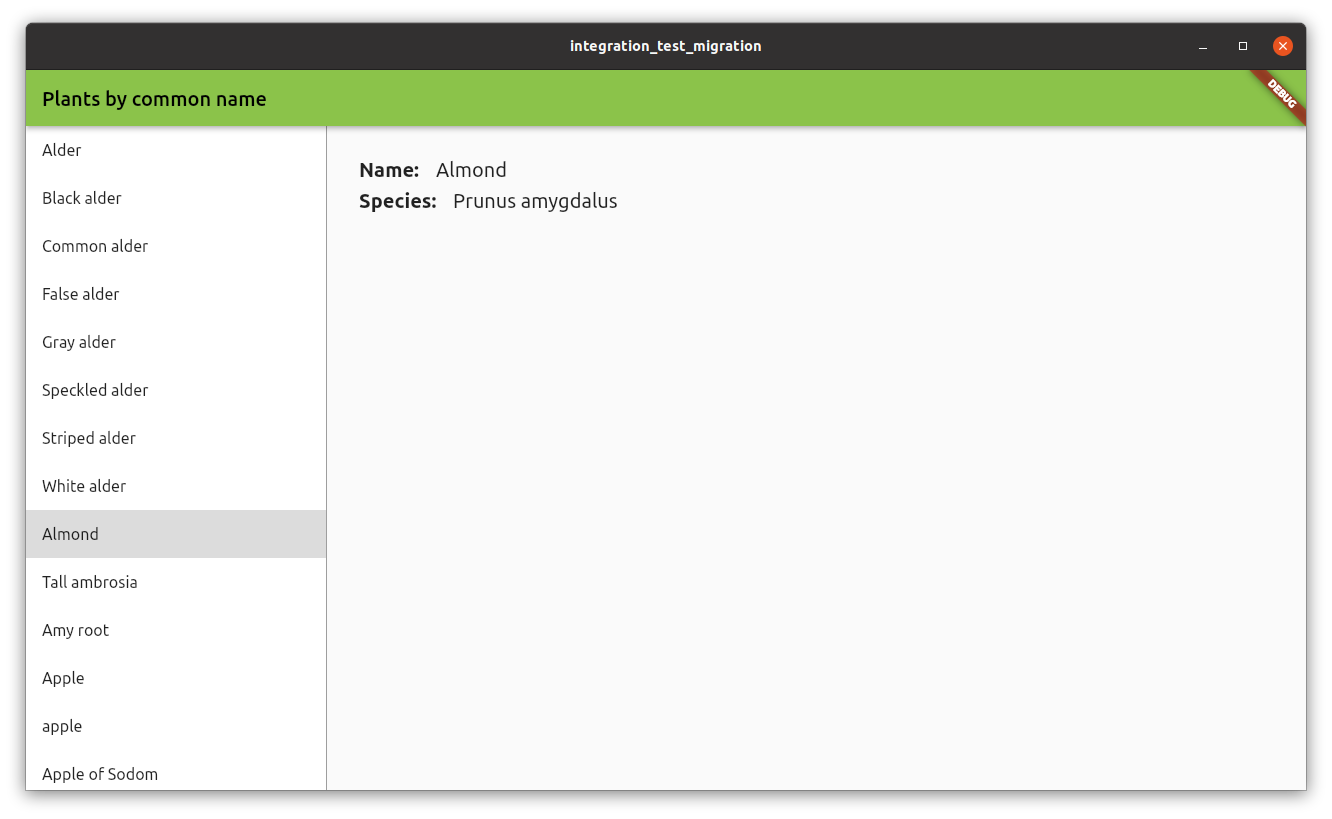 完整的程式碼範例可在 [Example Project][Example Project] 資料夾找到。
## 現有測試
此專案包含三個 `flutter_driver` 測試,
進行以下檢查:
* 驗證應用程式的初始狀態。
* 選取植物清單中的第一個項目。
* 捲動並選取植物清單中的最後一個項目。
這些測試存放於 `test_driver` 資料夾內的
`main_test.dart` 檔案中。
在此資料夾中還有一個名為 `main.dart` 的檔案,
其中包含對 `enableFlutterDriverExtension()` 方法的呼叫。
使用 `integration_test` 時,這個檔案將不再需要。
## 設定
若要開始使用 `integration_test` 套件,
請將 `integration_test`
加入你的 `pubspec.yaml` 檔案(如果尚未加入):
```yaml
dev_dependencies:
integration_test:
sdk: flutter
```
接下來,在你的專案中建立一個新的目錄 `integration_test/`,並在該處建立你的測試檔案,格式為:`_test.dart`。
## 測試遷移
本節包含了如何將現有 `flutter_driver` 測試遷移為 `integration_test` 測試的不同範例。
### 範例:驗證元件(Widget)是否顯示
當應用程式啟動時,右側的螢幕會顯示一段文字,提示使用者從清單中選擇一個植物。
此測試會驗證該文字是否有被顯示。
**flutter_driver**
在 `flutter_driver` 中,測試使用了 `waitFor`,
這會等待 `finder` 能夠定位到該元件 (Widget)。
如果找不到該元件,測試就會失敗。
```dart
test(
'do not select any item, verify please select text is displayed',
() async {
// Wait for 'please select' text is displayed
await driver.waitFor(find.text('Please select a plant from the list.'));
},
);
```
**integration_test**
在 `integration_test` 中,你需要執行兩個步驟:
1. 首先,使用 `tester.pumpWidget` 方法載入主要的應用程式元件(Widget)。
2. 接著,使用 `expect` 搭配比對器 `findsOneWidget`,以驗證該元件(Widget)是否已顯示。
```dart
testWidgets(
'do not select any item, verify please select text is displayed',
(tester) async {
// load the PlantsApp widget
await tester.pumpWidget(const PlantsApp());
// wait for data to load
await tester.pumpAndSettle();
// Find widget with 'please select'
final finder = find.text('Please select a plant from the list.');
// Check if widget is displayed
expect(finder, findsOneWidget);
},
);
```
### 範例:點擊動作
此測試會在清單中的第一個項目上執行點擊動作,
該項目是一個 `ListTile`,其文字為 "Alder"。
點擊後,測試會等待詳細資訊出現。
在此情境下,測試會等待具有文字 "Alnus" 的元件(Widget)被顯示出來。
此外,測試也會驗證
"Please select a plant from the list."
這段文字不再顯示。
**flutter_driver**
在 `flutter_driver` 中,使用 `driver.tap` 方法,透過 finder 在元件(Widget)上執行點擊。
若要驗證某個元件(Widget)未被顯示,
請使用 `waitForAbsent` 方法。
```dart
test('tap on the first item (Alder), verify selected', () async {
// find the item by text
final item = find.text('Alder');
// Wait for the list item to appear.
await driver.waitFor(item);
// Emulate a tap on the tile item.
await driver.tap(item);
// Wait for species name to be displayed
await driver.waitFor(find.text('Alnus'));
// 'please select' text should not be displayed
await driver.waitForAbsent(
find.text('Please select a plant from the list.'),
);
});
```
**integration_test**
在 `integration_test` 中,請使用 `tester.tap` 來執行點擊(tap)操作。
點擊操作之後,必須呼叫 `tester.pumpAndSettle`,以等待該操作完成,並確保所有 UI 變化都已發生。
若要驗證某個元件(Widget)未顯示,請使用相同的 `expect` 函式,搭配 `findsNothing` matcher。
```dart
testWidgets('tap on the first item (Alder), verify selected', (tester) async {
await tester.pumpWidget(const PlantsApp());
// wait for data to load
await tester.pumpAndSettle();
// find the item by text
final item = find.text('Alder');
// assert item is found
expect(item, findsOneWidget);
// Emulate a tap on the tile item.
await tester.tap(item);
await tester.pumpAndSettle();
// Species name should be displayed
expect(find.text('Alnus'), findsOneWidget);
// 'please select' text should not be displayed
expect(find.text('Please select a plant from the list.'), findsNothing);
});
```
### 範例:滾動
這個測試與前一個測試類似,
但它改為向下滾動並點擊最後一個項目。
**flutter_driver**
若要使用 `flutter_driver` 向下滾動,
請使用 `driver.scroll` 方法。
你必須提供要執行滾動動作的元件(Widget),
以及滾動所需的持續時間(duration)。
你也需要提供這次滾動動作的總位移(offset)。
```dart
test('scroll, tap on the last item (Zedoary), verify selected', () async {
// find the list of plants, by Key
final listFinder = find.byValueKey('listOfPlants');
// Scroll to the last position of the list
// a -100,000 pixels is enough to reach the bottom of the list
await driver.scroll(
listFinder,
0,
-100000,
const Duration(milliseconds: 500),
);
// find the item by text
final item = find.text('Zedoary');
// Wait for the list item to appear.
await driver.waitFor(item);
// Emulate a tap on the tile item.
await driver.tap(item);
// Wait for species name to be displayed
await driver.waitFor(find.text('Curcuma zedoaria'));
// 'please select' text should not be displayed
await driver.waitForAbsent(
find.text('Please select a plant from the list.'),
);
});
```
**integration_test**
有了 `integration_test`,可以使用 `tester.scrollUntilVisible` 方法。
現在不需要再提供要滾動的元件(Widget),
而是直接提供你要搜尋的項目。
在這個例子中,你正在搜尋
文字為 "Zedoary" 的項目,
它是列表中的最後一個項目。
此方法會搜尋任何 `Scrollable` 元件(Widget),
並使用指定的位移量來執行滾動動作。
這個動作會重複執行,直到該項目變為可見。
```dart
testWidgets('scroll, tap on the last item (Zedoary), verify selected', (
tester,
) async {
await tester.pumpWidget(const PlantsApp());
// wait for data to load
await tester.pumpAndSettle();
// find the item by text
final item = find.text('Zedoary');
// finds Scrollable widget and scrolls until item is visible
// a 100,000 pixels is enough to reach the bottom of the list
await tester.scrollUntilVisible(item, 100000);
// assert item is found
expect(item, findsOneWidget);
// Emulate a tap on the tile item.
await tester.tap(item);
await tester.pumpAndSettle();
// Wait for species name to be displayed
expect(find.text('Curcuma zedoaria'), findsOneWidget);
// 'please select' text should not be displayed
expect(find.text('Please select a plant from the list.'), findsNothing);
});
```
[Integration testing]: /testing/integration-tests
[widget testing]: /testing/overview#widget-tests
[Example Project]: https://github.com/flutter/website/tree/main/examples/integration_test_migration