# 設定您的專案
> 說明如何建立新的 Flutter 應用程式的操作指引。
預覽您將建置的維基百科閱讀器應用程式,並設定含有必要套件的初始專案。
title: 您將完成的事項
items:
- title: 預覽您將建置的維基百科閱讀器應用程式
icon: preview
- title: 新增用於處理 HTTP 請求與維基百科資料的套件
icon: inventory_2
- title: 設定初始專案結構
icon: code
---
### 簡介
在接下來的幾堂課中,您將學習如何在 Flutter 應用程式中處理資料。
您將建置一個能夠從 [Wikipedia API][] 擷取並顯示文章摘要的應用程式。
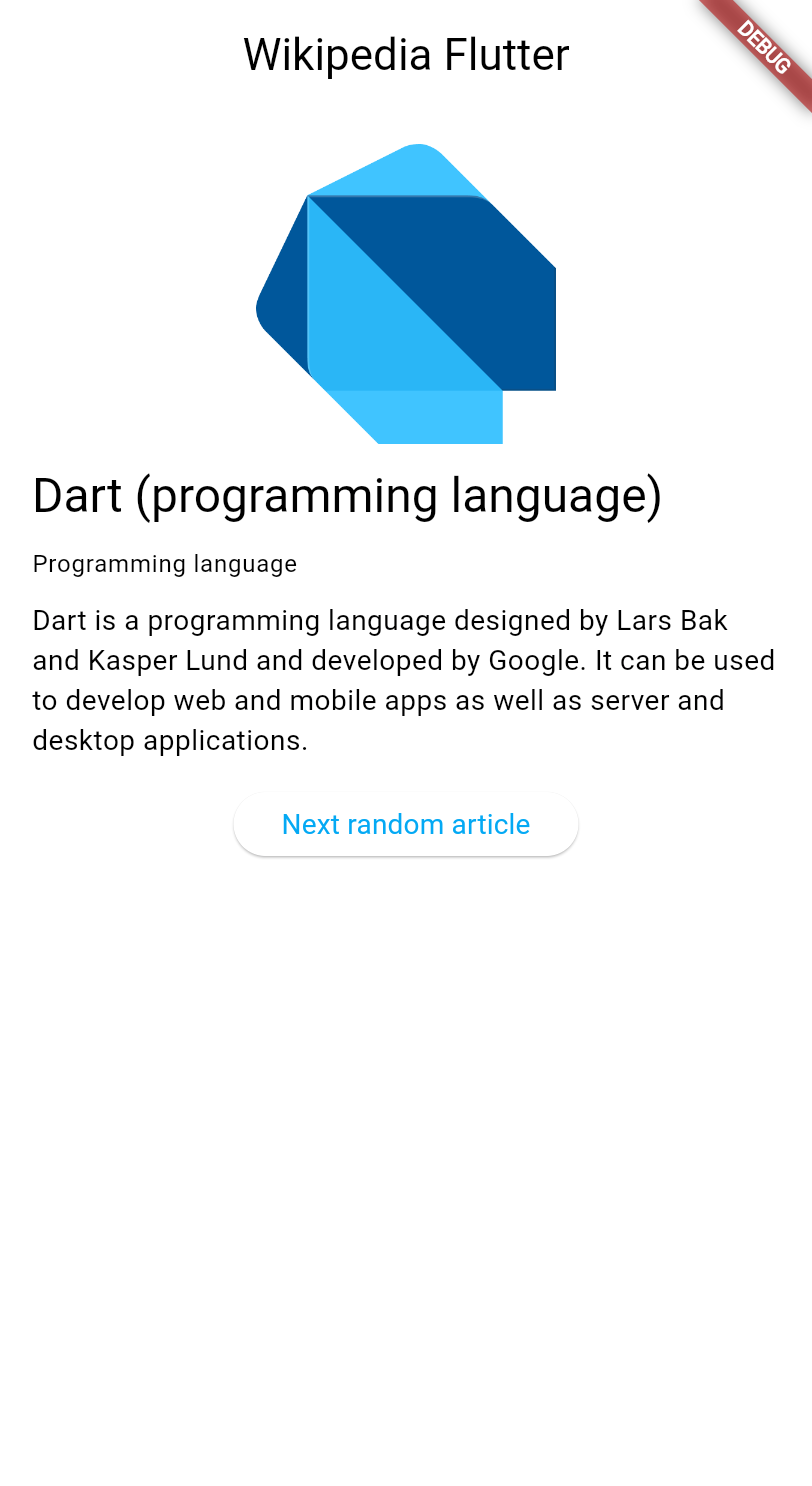 這些課程將探討以下主題:
- 在 Flutter 中發出 HTTP 請求。
- 使用 `ChangeNotifier` 管理應用程式狀態 (state)。
- 使用 MVVM 架構模式。
- 建立能在資料變更時自動更新的響應式使用者介面。
本教學假設您已完成 [Dart 入門][Getting started with Dart] 與 [Flutter UI 簡介][Introduction to Flutter UI] 教學,因此不會另行說明 HTTP、JSON 或元件 (Widget) 基礎等概念。
:::recommend 支持維基百科
[Wikipedia][] 是一項寶貴的資源,透過全球志工協作撰寫的數百萬篇文章,免費提供人類知識的存取管道。
請考慮[捐款給維基百科][donating to Wikipedia],以協助讓這項珍貴資源持續免費且對所有人開放。
:::
[Wikipedia API]: https://en.wikipedia.org/api/rest_v1/
[Getting started with Dart]: https://dart.dev/learn/tutorial
[Introduction to Flutter UI]: /learn/pathway/tutorial/create-an-app
[Wikipedia]: https://wikipedia.org/
[donating to Wikipedia]: https://donate.wikimedia.org/
### 建立新的 Flutter 專案
使用 [Flutter CLI][] 建立新的 Flutter 專案。
在您慣用的終端機中,執行以下指令以建立一個最簡化的 Flutter 應用程式:
```console
$ flutter create wikipedia_reader --empty
```
[Flutter CLI]: /reference/flutter-cli
### 新增必要的相依套件
您的應用程式需要 [`http` 套件][`http` package] 來發出 HTTP 請求,
以及 [`material_ui` 套件][`material_ui` package] 來提供部分 UI 元件。
將它們加入您的專案:
```console
$ cd wikipedia_reader && flutter pub add http material_ui && flutter pub get
```
[`http` package]: https://pub.dev/packages/http
[`material_ui` package]: https://pub.dev/packages/material_ui
### 檢視起始程式碼
首先,建立新檔案 `lib/summary.dart` 以定義維基百科文章摘要的資料模型。
此檔案沒有特殊邏輯,僅是代表維基百科 API 所回傳資料的類別集合。
您只需將下方程式碼複製到檔案中,之後便無需再關注此檔案。
若您對基本 Dart 類別尚不熟悉,請先閱讀 [Dart 入門][Dart Getting Started] 教學。
```dart title="lib/summary.dart" collapsed
/// Representation of the JSON data returned by the Wikipedia API.
class Summary {
/// Returns a new [Summary] instance.
Summary({
required this.titles,
required this.pageId,
required this.extract,
required this.extractHtml,
required this.lang,
required this.dir,
required this.url,
this.description,
this.thumbnail,
this.originalImage,
});
/// The title information of this article.
final TitlesSet titles;
/// The page ID of this article.
final int pageId;
/// The first few sentences of the article in plain text.
final String extract;
/// The first few sentences of the article in HTML format.
final String extractHtml;
/// The language code of the article's content, such as "en" for English.
final String lang;
/// The text directionality of the article's content, such as "ltr" or "rtl".
final String dir;
/// The URL of the page.
final String url;
/// A description of the article, if available.
final String? description;
/// A thumbnail-sized version of the article's primary image, if available.
final ImageFile? thumbnail;
/// The original full-sized article's primary image, if available.
final ImageFile? originalImage;
/// Whether this article has an image.
bool get hasImage => originalImage != null && thumbnail != null;
/// Returns a new [Summary] instance and imports its values from a JSON map
static Summary fromJson(Map json) {
return switch (json) {
{
'titles': final Map titles,
'pageid': final int pageId,
'extract': final String extract,
'extract_html': final String extractHtml,
'thumbnail': final Map thumbnail,
'originalimage': final Map originalImage,
'lang': final String lang,
'dir': final String dir,
'description': final String description,
'content_urls': {
'desktop': {'page': final String url},
'mobile': {'page': String _},
},
} =>
Summary(
titles: TitlesSet.fromJson(titles),
pageId: pageId,
extract: extract,
extractHtml: extractHtml,
thumbnail: ImageFile.fromJson(thumbnail),
originalImage: ImageFile.fromJson(originalImage),
lang: lang,
dir: dir,
description: description,
url: url,
),
{
'titles': final Map titles,
'pageid': final int pageId,
'extract': final String extract,
'extract_html': final String extractHtml,
'lang': final String lang,
'dir': final String dir,
'description': final String description,
'content_urls': {
'desktop': {'page': final String url},
'mobile': {'page': String _},
},
} =>
Summary(
titles: TitlesSet.fromJson(titles),
pageId: pageId,
extract: extract,
extractHtml: extractHtml,
lang: lang,
dir: dir,
description: description,
url: url,
),
{
'titles': final Map titles,
'pageid': final int pageId,
'extract': final String extract,
'extract_html': final String extractHtml,
'lang': final String lang,
'dir': final String dir,
'content_urls': {
'desktop': {'page': final String url},
'mobile': {'page': String _},
},
} =>
Summary(
titles: TitlesSet.fromJson(titles),
pageId: pageId,
extract: extract,
extractHtml: extractHtml,
lang: lang,
dir: dir,
url: url,
),
_ => throw FormatException('Could not deserialize Summary, json=$json'),
};
}
@override
String toString() =>
'Summary['
'titles=$titles, '
'pageId=$pageId, '
'extract=$extract, '
'extractHtml=$extractHtml, '
'thumbnail=${thumbnail ?? 'null'}, '
'originalImage=${originalImage ?? 'null'}, '
'lang=$lang, '
'dir=$dir, '
'description=$description'
']';
}
// Image path and size, but doesn't contain any Wikipedia descriptions.
class ImageFile {
/// Returns a new [ImageFile] instance.
ImageFile({required this.source, required this.width, required this.height});
/// The URI of the original image.
final String source;
/// The width of the original image.
final int width;
/// The height of the original image.
final int height;
/// The file extension of the image, or 'err' if one can't be determined.
String get extension {
final extension = getFileExtension(source);
// By default, return a non-viable image extension.
return extension ?? 'err';
}
/// Returns a JSON map representation of this [ImageFile].
Map toJson() {
return {
'source': source,
'width': width,
'height': height,
};
}
/// Returns a new [ImageFile] instance with its values populated from [json].
static ImageFile fromJson(Map json) {
if (json case {
'source': final String source,
'height': final int height,
'width': final int width,
}) {
return ImageFile(source: source, width: width, height: height);
}
throw FormatException('Could not deserialize OriginalImage, json=$json');
}
@override
String toString() =>
'OriginalImage[source_=$source, width=$width, height=$height]';
}
class TitlesSet {
/// Returns a new [TitlesSet] instance.
TitlesSet({
required this.canonical,
required this.normalized,
required this.display,
});
/// The non-prefixed DB key for the article.
///
/// Might contain changes such as underscores instead of spaces.
/// Best suited for making request URIs, but still requires percent-encoding.
final String canonical;
/// The [normalized title](https://www.mediawiki.org/wiki/API:Query#Example_2:_Title_normalization)
/// of the article.
final String normalized;
/// The title as it should be displayed to the user.
final String display;
/// Returns a new [TitlesSet] instance with its values populated from [json].
static TitlesSet fromJson(Map json) {
if (json case {
'canonical': final String canonical,
'normalized': final String normalized,
'display': final String display,
}) {
return TitlesSet(
canonical: canonical,
normalized: normalized,
display: display,
);
}
throw FormatException('Could not deserialize TitleSet, json=$json');
}
@override
String toString() =>
'TitlesSet['
'canonical=$canonical, '
'normalized=$normalized, '
'display=$display'
']';
}
String? getFileExtension(String file) {
final segments = file.split('.');
if (segments.isNotEmpty) return segments.last;
return null;
}
const acceptableImageFormats = ['png', 'jpg', 'jpeg'];
```
接著,開啟 `lib/main.dart`,將現有程式碼替換為以下基本結構,
其中已加入應用程式所需的必要匯入:
```dart title="lib/main.dart"
import 'dart:convert';
import 'dart:io';
import 'package:http/http.dart';
import 'package:material_ui/material_ui.dart';
import 'summary.dart';
void main() {
runApp(const MainApp());
}
class MainApp extends StatelessWidget {
const MainApp({super.key});
@override
Widget build(BuildContext context) {
return MaterialApp(
home: Scaffold(
appBar: AppBar(title: const Text('Wikipedia Flutter')),
body: const Center(child: Text('Loading...')),
),
);
}
}
```
此程式碼提供了帶有標題列與佔位內容的基本應用程式結構。
頂部的匯入項目包含了 HTTP 請求、JSON 解析以及維基百科資料模型所需的一切。
[Dart Getting Started]: https://dart.dev/tutorial
### 執行您的應用程式
執行您的應用程式,確認一切正常運作:
```console
$ flutter run -d chrome
```
您應該會看到一個簡單的應用程式,其應用程式列顯示「Wikipedia Flutter」,
畫面中央顯示「Loading...」。
### 回顧
title: 您完成的事項
subtitle: 以下是您在本課中建置與學習內容的摘要。
completed: true
items:
- title: 預覽了維基百科閱讀器應用程式
icon: preview
details: >-
您正在開始一個以資料處理為核心的新教學單元。
您將學習 HTTP 請求、使用 `ChangeNotifier` 進行狀態管理,
以及 MVVM 架構模式。
- title: 新增了 http 套件並建立了資料模型
icon: inventory_2
details: >-
您使用 `flutter pub add` 安裝了用於發出 HTTP 請求的 http 套件,
並為維基百科資料建立了 `Summary` 類別。
套件讓您能夠善用社群已建置的現有程式碼,
而無需從頭開始建置所有功能。
- title: 設定了初始專案結構
icon: code
details: >-
您的應用程式已具備基本結構,包含 HTTP 請求、JSON 解析
以及維基百科資料所需的所有匯入項目。
您已準備好開始從維基百科 API 擷取真實資料!
### 自我測驗
- question: "執行 `flutter create` 時,`--empty` 旗標的作用是什麼?"
options:
- text: 建立一個完全沒有任何檔案的專案。
correct: false
explanation: 專案仍會包含必要的檔案;它只是使用最簡化的範本。
- text: 建立一個樣板程式碼較少的最簡化 Flutter 專案。
correct: true
explanation: "`--empty` 旗標會產生一個不含預設計數器應用程式的最簡化起始範本。"
- text: 建立一個不含任何相依套件的專案。
correct: false
explanation: 專案仍會包含 Flutter 核心相依套件。
- text: 建立一個只能在網頁上執行的專案。
correct: false
explanation: 此旗標不限制平台;它只影響起始範本。
- question: 用來為 Flutter 專案新增套件相依性的指令是什麼?
options:
- text: "`flutter install [package_name]`"
correct: false
explanation: "正確的指令使用 `pub add`,而非 `install`。"
- text: "`flutter pub add [package_name]`"
correct: true
explanation: "執行 `flutter pub add` 會將套件加入 pubspec.yaml 並下載套件。"
- text: "`dart get [package_name]`"
correct: false
explanation: "新增套件的指令是 `flutter pub add` 或直接編輯 pubspec.yaml。"
- text: "`flutter package install [package_name]`"
correct: false
explanation: "不存在 `flutter package` 指令;請使用 `flutter pub add`。"
這些課程將探討以下主題:
- 在 Flutter 中發出 HTTP 請求。
- 使用 `ChangeNotifier` 管理應用程式狀態 (state)。
- 使用 MVVM 架構模式。
- 建立能在資料變更時自動更新的響應式使用者介面。
本教學假設您已完成 [Dart 入門][Getting started with Dart] 與 [Flutter UI 簡介][Introduction to Flutter UI] 教學,因此不會另行說明 HTTP、JSON 或元件 (Widget) 基礎等概念。
:::recommend 支持維基百科
[Wikipedia][] 是一項寶貴的資源,透過全球志工協作撰寫的數百萬篇文章,免費提供人類知識的存取管道。
請考慮[捐款給維基百科][donating to Wikipedia],以協助讓這項珍貴資源持續免費且對所有人開放。
:::
[Wikipedia API]: https://en.wikipedia.org/api/rest_v1/
[Getting started with Dart]: https://dart.dev/learn/tutorial
[Introduction to Flutter UI]: /learn/pathway/tutorial/create-an-app
[Wikipedia]: https://wikipedia.org/
[donating to Wikipedia]: https://donate.wikimedia.org/
### 建立新的 Flutter 專案
使用 [Flutter CLI][] 建立新的 Flutter 專案。
在您慣用的終端機中,執行以下指令以建立一個最簡化的 Flutter 應用程式:
```console
$ flutter create wikipedia_reader --empty
```
[Flutter CLI]: /reference/flutter-cli
### 新增必要的相依套件
您的應用程式需要 [`http` 套件][`http` package] 來發出 HTTP 請求,
以及 [`material_ui` 套件][`material_ui` package] 來提供部分 UI 元件。
將它們加入您的專案:
```console
$ cd wikipedia_reader && flutter pub add http material_ui && flutter pub get
```
[`http` package]: https://pub.dev/packages/http
[`material_ui` package]: https://pub.dev/packages/material_ui
### 檢視起始程式碼
首先,建立新檔案 `lib/summary.dart` 以定義維基百科文章摘要的資料模型。
此檔案沒有特殊邏輯,僅是代表維基百科 API 所回傳資料的類別集合。
您只需將下方程式碼複製到檔案中,之後便無需再關注此檔案。
若您對基本 Dart 類別尚不熟悉,請先閱讀 [Dart 入門][Dart Getting Started] 教學。
```dart title="lib/summary.dart" collapsed
/// Representation of the JSON data returned by the Wikipedia API.
class Summary {
/// Returns a new [Summary] instance.
Summary({
required this.titles,
required this.pageId,
required this.extract,
required this.extractHtml,
required this.lang,
required this.dir,
required this.url,
this.description,
this.thumbnail,
this.originalImage,
});
/// The title information of this article.
final TitlesSet titles;
/// The page ID of this article.
final int pageId;
/// The first few sentences of the article in plain text.
final String extract;
/// The first few sentences of the article in HTML format.
final String extractHtml;
/// The language code of the article's content, such as "en" for English.
final String lang;
/// The text directionality of the article's content, such as "ltr" or "rtl".
final String dir;
/// The URL of the page.
final String url;
/// A description of the article, if available.
final String? description;
/// A thumbnail-sized version of the article's primary image, if available.
final ImageFile? thumbnail;
/// The original full-sized article's primary image, if available.
final ImageFile? originalImage;
/// Whether this article has an image.
bool get hasImage => originalImage != null && thumbnail != null;
/// Returns a new [Summary] instance and imports its values from a JSON map
static Summary fromJson(Map json) {
return switch (json) {
{
'titles': final Map titles,
'pageid': final int pageId,
'extract': final String extract,
'extract_html': final String extractHtml,
'thumbnail': final Map thumbnail,
'originalimage': final Map originalImage,
'lang': final String lang,
'dir': final String dir,
'description': final String description,
'content_urls': {
'desktop': {'page': final String url},
'mobile': {'page': String _},
},
} =>
Summary(
titles: TitlesSet.fromJson(titles),
pageId: pageId,
extract: extract,
extractHtml: extractHtml,
thumbnail: ImageFile.fromJson(thumbnail),
originalImage: ImageFile.fromJson(originalImage),
lang: lang,
dir: dir,
description: description,
url: url,
),
{
'titles': final Map titles,
'pageid': final int pageId,
'extract': final String extract,
'extract_html': final String extractHtml,
'lang': final String lang,
'dir': final String dir,
'description': final String description,
'content_urls': {
'desktop': {'page': final String url},
'mobile': {'page': String _},
},
} =>
Summary(
titles: TitlesSet.fromJson(titles),
pageId: pageId,
extract: extract,
extractHtml: extractHtml,
lang: lang,
dir: dir,
description: description,
url: url,
),
{
'titles': final Map titles,
'pageid': final int pageId,
'extract': final String extract,
'extract_html': final String extractHtml,
'lang': final String lang,
'dir': final String dir,
'content_urls': {
'desktop': {'page': final String url},
'mobile': {'page': String _},
},
} =>
Summary(
titles: TitlesSet.fromJson(titles),
pageId: pageId,
extract: extract,
extractHtml: extractHtml,
lang: lang,
dir: dir,
url: url,
),
_ => throw FormatException('Could not deserialize Summary, json=$json'),
};
}
@override
String toString() =>
'Summary['
'titles=$titles, '
'pageId=$pageId, '
'extract=$extract, '
'extractHtml=$extractHtml, '
'thumbnail=${thumbnail ?? 'null'}, '
'originalImage=${originalImage ?? 'null'}, '
'lang=$lang, '
'dir=$dir, '
'description=$description'
']';
}
// Image path and size, but doesn't contain any Wikipedia descriptions.
class ImageFile {
/// Returns a new [ImageFile] instance.
ImageFile({required this.source, required this.width, required this.height});
/// The URI of the original image.
final String source;
/// The width of the original image.
final int width;
/// The height of the original image.
final int height;
/// The file extension of the image, or 'err' if one can't be determined.
String get extension {
final extension = getFileExtension(source);
// By default, return a non-viable image extension.
return extension ?? 'err';
}
/// Returns a JSON map representation of this [ImageFile].
Map toJson() {
return {
'source': source,
'width': width,
'height': height,
};
}
/// Returns a new [ImageFile] instance with its values populated from [json].
static ImageFile fromJson(Map json) {
if (json case {
'source': final String source,
'height': final int height,
'width': final int width,
}) {
return ImageFile(source: source, width: width, height: height);
}
throw FormatException('Could not deserialize OriginalImage, json=$json');
}
@override
String toString() =>
'OriginalImage[source_=$source, width=$width, height=$height]';
}
class TitlesSet {
/// Returns a new [TitlesSet] instance.
TitlesSet({
required this.canonical,
required this.normalized,
required this.display,
});
/// The non-prefixed DB key for the article.
///
/// Might contain changes such as underscores instead of spaces.
/// Best suited for making request URIs, but still requires percent-encoding.
final String canonical;
/// The [normalized title](https://www.mediawiki.org/wiki/API:Query#Example_2:_Title_normalization)
/// of the article.
final String normalized;
/// The title as it should be displayed to the user.
final String display;
/// Returns a new [TitlesSet] instance with its values populated from [json].
static TitlesSet fromJson(Map json) {
if (json case {
'canonical': final String canonical,
'normalized': final String normalized,
'display': final String display,
}) {
return TitlesSet(
canonical: canonical,
normalized: normalized,
display: display,
);
}
throw FormatException('Could not deserialize TitleSet, json=$json');
}
@override
String toString() =>
'TitlesSet['
'canonical=$canonical, '
'normalized=$normalized, '
'display=$display'
']';
}
String? getFileExtension(String file) {
final segments = file.split('.');
if (segments.isNotEmpty) return segments.last;
return null;
}
const acceptableImageFormats = ['png', 'jpg', 'jpeg'];
```
接著,開啟 `lib/main.dart`,將現有程式碼替換為以下基本結構,
其中已加入應用程式所需的必要匯入:
```dart title="lib/main.dart"
import 'dart:convert';
import 'dart:io';
import 'package:http/http.dart';
import 'package:material_ui/material_ui.dart';
import 'summary.dart';
void main() {
runApp(const MainApp());
}
class MainApp extends StatelessWidget {
const MainApp({super.key});
@override
Widget build(BuildContext context) {
return MaterialApp(
home: Scaffold(
appBar: AppBar(title: const Text('Wikipedia Flutter')),
body: const Center(child: Text('Loading...')),
),
);
}
}
```
此程式碼提供了帶有標題列與佔位內容的基本應用程式結構。
頂部的匯入項目包含了 HTTP 請求、JSON 解析以及維基百科資料模型所需的一切。
[Dart Getting Started]: https://dart.dev/tutorial
### 執行您的應用程式
執行您的應用程式,確認一切正常運作:
```console
$ flutter run -d chrome
```
您應該會看到一個簡單的應用程式,其應用程式列顯示「Wikipedia Flutter」,
畫面中央顯示「Loading...」。
### 回顧
title: 您完成的事項
subtitle: 以下是您在本課中建置與學習內容的摘要。
completed: true
items:
- title: 預覽了維基百科閱讀器應用程式
icon: preview
details: >-
您正在開始一個以資料處理為核心的新教學單元。
您將學習 HTTP 請求、使用 `ChangeNotifier` 進行狀態管理,
以及 MVVM 架構模式。
- title: 新增了 http 套件並建立了資料模型
icon: inventory_2
details: >-
您使用 `flutter pub add` 安裝了用於發出 HTTP 請求的 http 套件,
並為維基百科資料建立了 `Summary` 類別。
套件讓您能夠善用社群已建置的現有程式碼,
而無需從頭開始建置所有功能。
- title: 設定了初始專案結構
icon: code
details: >-
您的應用程式已具備基本結構,包含 HTTP 請求、JSON 解析
以及維基百科資料所需的所有匯入項目。
您已準備好開始從維基百科 API 擷取真實資料!
### 自我測驗
- question: "執行 `flutter create` 時,`--empty` 旗標的作用是什麼?"
options:
- text: 建立一個完全沒有任何檔案的專案。
correct: false
explanation: 專案仍會包含必要的檔案;它只是使用最簡化的範本。
- text: 建立一個樣板程式碼較少的最簡化 Flutter 專案。
correct: true
explanation: "`--empty` 旗標會產生一個不含預設計數器應用程式的最簡化起始範本。"
- text: 建立一個不含任何相依套件的專案。
correct: false
explanation: 專案仍會包含 Flutter 核心相依套件。
- text: 建立一個只能在網頁上執行的專案。
correct: false
explanation: 此旗標不限制平台;它只影響起始範本。
- question: 用來為 Flutter 專案新增套件相依性的指令是什麼?
options:
- text: "`flutter install [package_name]`"
correct: false
explanation: "正確的指令使用 `pub add`,而非 `install`。"
- text: "`flutter pub add [package_name]`"
correct: true
explanation: "執行 `flutter pub add` 會將套件加入 pubspec.yaml 並下載套件。"
- text: "`dart get [package_name]`"
correct: false
explanation: "新增套件的指令是 `flutter pub add` 或直接編輯 pubspec.yaml。"
- text: "`flutter package install [package_name]`"
correct: false
explanation: "不存在 `flutter package` 指令;請使用 `flutter pub add`。"