# 樂觀狀態(Optimistic state)
> 透過實作樂觀狀態,提升應用程式的響應式體驗。
在建立使用者體驗時,
效能的「感知」有時和實際程式碼效能一樣重要。
一般來說,使用者不喜歡等待動作完成才看到結果,
而任何超過幾毫秒的延遲,從使用者角度來看,都可能被認為是「慢」或「沒有回應」。
開發者可以透過在背景任務尚未完全完成前,
先呈現成功的 UI 狀態,來減輕這種負面感受。
例如,當點擊「訂閱」按鈕時,
即使背景的訂閱 API 呼叫尚在執行,
也能立即將按鈕狀態變為「已訂閱」。
這種技巧稱為樂觀狀態 (Optimistic State)、樂觀 UI (Optimistic UI) 或
樂觀使用者體驗 (Optimistic User Experience)。
在本教學中,
你將會使用樂觀狀態來實作一個應用程式功能,
並遵循 [Flutter 架構指引](/app-architecture)。
## 範例功能:訂閱按鈕
這個範例實作了一個訂閱按鈕,
類似於你在影音串流應用程式或電子報中會看到的設計。
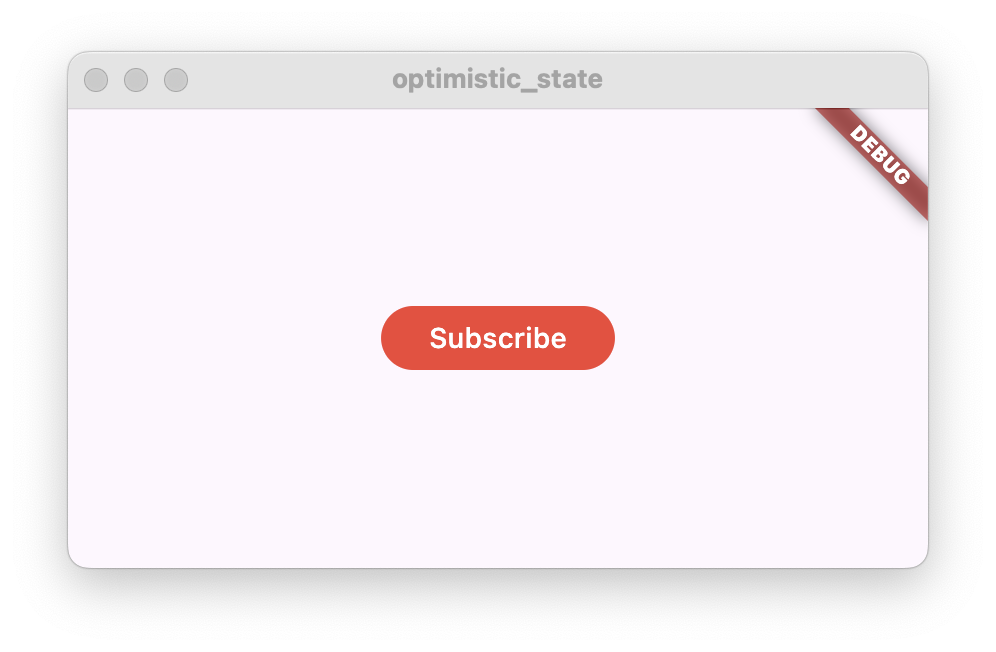 當按鈕被點擊時,應用程式會呼叫外部 API,
執行訂閱動作,
例如在資料庫中記錄該使用者已加入訂閱名單。
為了示範,本範例不會實作實際的後端程式碼,
而是用一個假的動作來模擬網路請求。
如果呼叫成功,
按鈕文字會從「Subscribe」變成「Subscribed」,
按鈕背景顏色也會改變。
相反地,如果呼叫失敗,
按鈕文字應該恢復為「Subscribe」,
並且 UI 會顯示錯誤訊息給使用者,
例如使用 Snackbar。
根據樂觀狀態的概念,
按鈕在被點擊時應立即變為「Subscribed」,
只有在請求失敗時才恢復為「Subscribe」。
 ## 功能架構
首先,請定義此功能的架構。
依照架構指引,
在 Flutter 專案中建立以下 Dart 類別:
- 一個名為 `SubscribeButton` 的 `StatefulWidget`
- 一個繼承自 `ChangeNotifier` 的 `SubscribeButtonViewModel` 類別
- 一個名為 `SubscriptionRepository` 的類別
```dart
class SubscribeButton extends StatefulWidget {
const SubscribeButton({super.key});
@override
State createState() => _SubscribeButtonState();
}
class _SubscribeButtonState extends State {
@override
Widget build(BuildContext context) {
return const Placeholder();
}
}
class SubscribeButtonViewModel extends ChangeNotifier {}
class SubscriptionRepository {}
```
`SubscribeButton` 元件 (Widget) 和 `SubscribeButtonViewModel` 代表此解決方案的呈現層(presentation layer)。
該元件 (Widget) 會顯示一個按鈕,根據訂閱狀態顯示文字「Subscribe」或「Subscribed」。
ViewModel 會包含訂閱狀態。
當按鈕被點擊時,元件 (Widget) 會呼叫 ViewModel 來執行動作。
`SubscriptionRepository` 會實作一個 subscribe 方法,當動作失敗時會拋出例外(exception)。
ViewModel 在執行訂閱動作時會呼叫此方法。
接下來,將它們串接起來,方法是將 `SubscriptionRepository` 加入到 `SubscribeButtonViewModel` 中:
```dart
class SubscribeButtonViewModel extends ChangeNotifier {
SubscribeButtonViewModel({required this.subscriptionRepository});
final SubscriptionRepository subscriptionRepository;
}
```
並將 `SubscribeButtonViewModel` 加到 `SubscribeButton` 元件 (Widget) 中:
```dart
class SubscribeButton extends StatefulWidget {
const SubscribeButton({super.key, required this.viewModel});
/// Subscribe button view model.
final SubscribeButtonViewModel viewModel;
@override
State createState() => _SubscribeButtonState();
}
```
現在你已經建立了基本的解決方案架構,
接下來可以用以下方式建立 `SubscribeButton` 元件 (Widget):
```dart
SubscribeButton(
viewModel: SubscribeButtonViewModel(
subscriptionRepository: SubscriptionRepository(),
),
)
```
### 實作 `SubscriptionRepository`
在 `SubscriptionRepository` 中新增一個名為 `subscribe()` 的非同步方法,程式碼如下:
```dart
class SubscriptionRepository {
/// Simulates a network request and then fails.
Future subscribe() async {
// Simulate a network request.
await Future.delayed(const Duration(seconds: 1));
// Fail after one second.
throw Exception('Failed to subscribe');
}
}
```
對 `await Future.delayed()` 的呼叫,並設定為一秒的延遲,是用來模擬一個長時間執行的請求。
該方法的執行會暫停一秒,然後才會繼續執行。
為了模擬請求失敗的情境,`subscribe` 方法會在結尾拋出一個例外(exception)。
這會在後續實作樂觀狀態 (Optimistic State) 時,用來展示如何從失敗的請求中復原。
### 實作 `SubscribeButtonViewModel`
為了表示訂閱(subscription)的狀態,以及可能發生的錯誤狀態,請在 `SubscribeButtonViewModel` 中加入下列公開成員:
```dart
/// Whether the user is subscribed.
bool subscribed = false;
/// Whether the subscription action has failed.
bool error = false;
```
兩者在啟動時都會設為 `false`。
根據樂觀狀態 (Optimistic State) 的設計理念,
當使用者點擊訂閱按鈕時,`subscribed` 狀態會立即變更為 `true`。
只有在操作失敗時,才會再變回 `false`。
當操作失敗時,`error` 狀態會變更為 `true`,
這會通知 `SubscribeButton` 元件 (Widget) 向使用者顯示錯誤訊息。
當錯誤訊息顯示完畢後,該變數應該回復為 `false`。
接下來,實作一個非同步的 `subscribe()` 方法:
```dart
// Subscription action
Future subscribe() async {
// Ignore taps when subscribed.
if (subscribed) {
return;
}
// Optimistic state.
// It will be reverted if the subscription fails.
subscribed = true;
// Notify listeners to update the UI.
notifyListeners();
try {
await subscriptionRepository.subscribe();
} catch (e) {
print('Failed to subscribe: $e');
// Revert to the previous state.
subscribed = false;
// Set the error state.
error = true;
} finally {
notifyListeners();
}
}
```
如前所述,該方法首先將 `subscribed` 狀態設為 `true`,然後呼叫 `notifyListeners()`。
這會強制 UI 更新,按鈕的外觀也會改變,向使用者顯示「Subscribed」文字。
接著,該方法會執行實際對 repository 的呼叫。
這個呼叫會被 `try-catch` 包裹,以捕捉可能拋出的任何例外。
如果捕捉到例外,則會將 `subscribed` 狀態設回 `false`,並將 `error` 狀態設為 `true`。
最後再呼叫 `notifyListeners()`,將 UI 變回「Subscribe」。
如果沒有發生例外,流程就已完成,因為 UI 已經反映了成功狀態。
完整的 `SubscribeButtonViewModel` 應如下所示:
```dart
/// Subscribe button view model.
/// Handles the subscribe action and exposes the state to the subscription.
class SubscribeButtonViewModel extends ChangeNotifier {
SubscribeButtonViewModel({required this.subscriptionRepository});
final SubscriptionRepository subscriptionRepository;
/// Whether the user is subscribed.
bool subscribed = false;
/// Whether the subscription action has failed.
bool error = false;
// Subscription action
Future subscribe() async {
// Ignore taps when subscribed.
if (subscribed) {
return;
}
// Optimistic state.
// It will be reverted if the subscription fails.
subscribed = true;
// Notify listeners to update the UI.
notifyListeners();
try {
await subscriptionRepository.subscribe();
} catch (e) {
print('Failed to subscribe: $e');
// Revert to the previous state.
subscribed = false;
// Set the error state.
error = true;
} finally {
notifyListeners();
}
}
}
```
### 實作 `SubscribeButton`
在這個步驟中,
你將先實作 `SubscribeButton` 的 build 方法,
接著實作此功能的錯誤處理。
請將以下程式碼新增到 build 方法中:
```dart
@override
Widget build(BuildContext context) {
return ListenableBuilder(
listenable: widget.viewModel,
builder: (context, _) {
return FilledButton(
onPressed: widget.viewModel.subscribe,
style: widget.viewModel.subscribed
? SubscribeButtonStyle.subscribed
: SubscribeButtonStyle.unsubscribed,
child: widget.viewModel.subscribed
? const Text('Subscribed')
: const Text('Subscribe'),
);
},
);
}
```
這個 build 方法包含一個 `ListenableBuilder`,
它會監聽來自 view model 的變化。
接著,builder 會建立一個 `FilledButton`,
根據 view model 的狀態顯示「Subscribed」或「Subscribe」文字。
按鈕的樣式也會依據這個狀態而改變。
此外,當按鈕被點擊時,
它會執行 view model 中的 `subscribe()` 方法。
`SubscribeButtonStyle` 可以在這裡找到。
請將這個 class 加在 `SubscribeButton` 旁邊。
你可以自由修改 `ButtonStyle`。
```dart
class SubscribeButtonStyle {
static const unsubscribed = ButtonStyle(
backgroundColor: WidgetStatePropertyAll(Colors.red),
);
static const subscribed = ButtonStyle(
backgroundColor: WidgetStatePropertyAll(Colors.green),
);
}
```
如果你現在執行應用程式,
你會看到按鈕在被按下時會改變,
但它會在沒有顯示錯誤的情況下回復到原本的狀態。
### 錯誤處理
為了處理錯誤,
請在 `SubscribeButtonState` 中加入 `initState()` 和 `dispose()` 方法,
然後再加入 `_onViewModelChange()` 方法。
```dart
@override
void initState() {
super.initState();
widget.viewModel.addListener(_onViewModelChange);
}
@override
void dispose() {
widget.viewModel.removeListener(_onViewModelChange);
super.dispose();
}
```
```dart
/// Listen to ViewModel changes.
void _onViewModelChange() {
// If the subscription action has failed.
if (widget.viewModel.error) {
// Reset the error state.
widget.viewModel.error = false;
// Show an error message.
ScaffoldMessenger.of(context)
.showSnackBar(const SnackBar(content: Text('Failed to subscribe')));
}
}
```
`addListener()` 呼叫會註冊 `_onViewModelChange()` 方法,
當 view model 通知監聽者時會被呼叫。
當元件 (Widget) 被銷毀時,務必呼叫 `removeListener()`,
以避免產生錯誤。
`_onViewModelChange()` 方法會檢查 `error` 狀態,
如果為 `true`,
則會向使用者顯示 `Snackbar`,以顯示錯誤訊息。
同時,`error` 狀態會被設回 `false`,
以避免當 view model 再次呼叫 `notifyListeners()` 時
重複顯示錯誤訊息。
## 進階樂觀狀態
在本教學中,
你已學會如何以單一二元狀態實作樂觀狀態 (Optimistic State),
但你也可以透過加入第三個暫時性狀態,
來建立更進階的解決方案,
用以表示該動作仍在執行中。
例如,在聊天應用程式中,當使用者傳送新訊息時,
應用程式會在聊天視窗中顯示新的聊天訊息,
但會加上一個圖示,表示該訊息仍待傳送。
當訊息成功傳送後,該圖示就會被移除。
在訂閱按鈕的範例中,
你可以在 view model 中新增一個旗標,
用來表示 `subscribe()` 方法仍在執行中,
或是使用 Command pattern 的執行狀態,
然後稍微修改按鈕樣式,以顯示操作正在進行。
## 互動範例
此範例展示了 `SubscribeButton` 元件 (Widget),
搭配 `SubscribeButtonViewModel`
以及 `SubscriptionRepository`,
共同實作具有樂觀狀態 (Optimistic State) 的訂閱點擊動作。
當你點擊按鈕時,
按鈕文字會從「Subscribe」變為「Subscribed」。一秒後,
repository 會拋出例外,
該例外會被 view model 捕捉,
按鈕會恢復顯示「Subscribe」,
同時顯示帶有錯誤訊息的 Snackbar。
```dartpad title="Flutter Optimistic State example in DartPad" run="true"
// ignore_for_file: avoid_print
import 'package:flutter/material.dart';
void main() {
runApp(const MyApp());
}
class MyApp extends StatelessWidget {
const MyApp({super.key});
// This widget is the root of your application.
@override
Widget build(BuildContext context) {
return MaterialApp(
home: Scaffold(
body: Center(
child: SubscribeButton(
viewModel: SubscribeButtonViewModel(
subscriptionRepository: SubscriptionRepository(),
),
),
),
),
);
}
}
/// A button that simulates a subscription action.
/// For example, subscribing to a newsletter or a streaming channel.
class SubscribeButton extends StatefulWidget {
const SubscribeButton({super.key, required this.viewModel});
/// Subscribe button view model.
final SubscribeButtonViewModel viewModel;
@override
State createState() => _SubscribeButtonState();
}
class _SubscribeButtonState extends State {
@override
void initState() {
super.initState();
widget.viewModel.addListener(_onViewModelChange);
}
@override
void dispose() {
widget.viewModel.removeListener(_onViewModelChange);
super.dispose();
}
@override
Widget build(BuildContext context) {
return ListenableBuilder(
listenable: widget.viewModel,
builder: (context, _) {
return FilledButton(
onPressed: widget.viewModel.subscribe,
style: widget.viewModel.subscribed
? SubscribeButtonStyle.subscribed
: SubscribeButtonStyle.unsubscribed,
child: widget.viewModel.subscribed
? const Text('Subscribed')
: const Text('Subscribe'),
);
},
);
}
/// Listen to ViewModel changes.
void _onViewModelChange() {
// If the subscription action has failed.
if (widget.viewModel.error) {
// Reset the error state.
widget.viewModel.error = false;
// Show an error message.
ScaffoldMessenger.of(context)
.showSnackBar(const SnackBar(content: Text('Failed to subscribe')));
}
}
}
class SubscribeButtonStyle {
static const unsubscribed = ButtonStyle(
backgroundColor: WidgetStatePropertyAll(Colors.red),
);
static const subscribed = ButtonStyle(
backgroundColor: WidgetStatePropertyAll(Colors.green),
);
}
/// Subscribe button view model.
/// Handles the subscribe action and exposes the state to the subscription.
class SubscribeButtonViewModel extends ChangeNotifier {
SubscribeButtonViewModel({required this.subscriptionRepository});
final SubscriptionRepository subscriptionRepository;
/// Whether the user is subscribed.
bool subscribed = false;
/// Whether the subscription action has failed.
bool error = false;
// Subscription action
Future subscribe() async {
// Ignore taps when subscribed.
if (subscribed) {
return;
}
// Optimistic state.
// It will be reverted if the subscription fails.
subscribed = true;
// Notify listeners to update the UI.
notifyListeners();
try {
await subscriptionRepository.subscribe();
} catch (e) {
print('Failed to subscribe: $e');
// Revert to the previous state.
subscribed = false;
// Set the error state.
error = true;
} finally {
notifyListeners();
}
}
}
/// Repository of subscriptions.
class SubscriptionRepository {
/// Simulates a network request and then fails.
Future subscribe() async {
// Simulate a network request.
await Future.delayed(const Duration(seconds: 1));
// Fail after one second.
throw Exception('Failed to subscribe');
}
}
```
[Flutter architecture guidelines]:/app-architecture